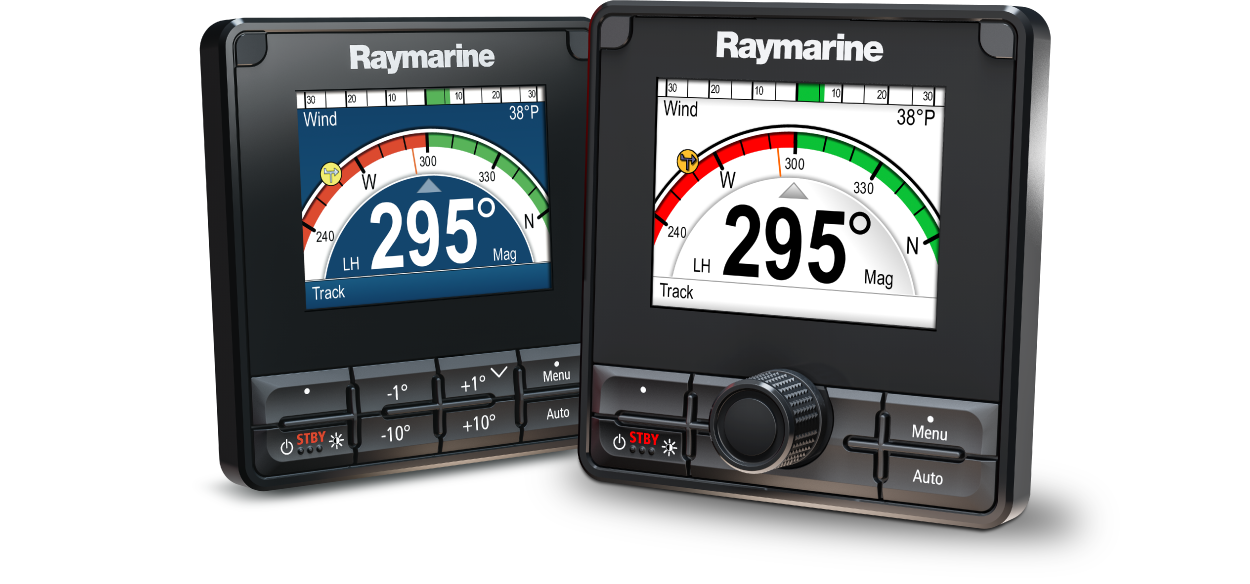
p70 / p70s / p70R / p70Rs Commissioning and Operation Instructions
Let’s Go!
How to navigate this document
Legal notices
Important information
Safety warnings
Ensure safe navigation
Maintain a permanent watch
Autopilot usage
Product warnings
Sun covers
Product cleaning
Regulatory notices
TFT Displays
Water ingress
Disclaimer
PSTI Compliance
Product disposal
Warranty policy and registration
IMO and SOLAS
Technical accuracy
Publication copyright
Document information
Applicable products
Compatible autopilot systems
Product documentation
Printed (hardcopy) product manuals
Document conventions
Document illustrations
Glossary
Software details
Applicable software version
Software compatibility
Software updates
Checking hardware and software information
Installing software updates
Performing software updates
Getting started
Commissioning
Controls
Switching on the display
Switching off the display
Completing the set up wizard
Autopilot functions and modes
Autopilot response levels
Automatic turning
Adjusting the display’s brightness
Shared Brightness
Assigning A Network Group
Unsharing the display
Changing the color scheme
Setting the display response
Multiple data sources (MDS)
Selecting a preferred data source
Commissioning — Evolution autopilot system
Autopilot commissioning — main differences between Evolution and SPX systems
Commissioning
Commissioning pre-requisites
Commissioning steps
Vessel hull type selection
Using the Dockside wizard
Selecting a drive type
Aligning the rudder
Setting the rudder limit
Checking the rudder drive
Checking the rudder alignment (Align Rudder)
Hard-over time
Adjusting the hard-over time — Evolution
Rudder check
Compass linearization — Evolution autopilots
Accessing the compass deviation indicator
Adjusting the Compass Offset
Compass lock
Locking the compass
Commissioning — SPX and SmartPilot systems
SPX and SmartPilot autopilot installation
Pilot response
Making temporary changes to pilot response
Commissioning
Commissioning pre-requisites
Commissioning process
Powering on and off
Using the Set-up Wizard
Vessel hull type selection
Dockside calibration
Using the Dockside wizard
Selecting a drive type
Checking the rudder alignment (Align Rudder)
Rudder Limit setting
Checking the rudder drive
Dealer settings
Adjusting the hard-over time — SmartPilot and SPX
Rudder check
Sea trial calibration
Seatrial calibration
Maintain sensible speeds
Compass swing
Aligning compass to GPS
Aligning compass manually
Auto Learn
Autolearn
Performing Auto learn
System changes
Checking autopilot operation
Checking rudder gain
Checking counter rudder
Rudder Damping
AutoTrim settings
Autopilot modes
Auto
Maintain a permanent watch
Automatically steering to a heading
Changing course in auto mode
Disengaging the autopilot (Standby mode)
Mode menu
Patterns
Using a fishing pattern
Track mode
Using track mode
Waypoint arrival circle
Waypoint arrival
Waypoint advance warning
Arriving at a waypoint
Cross track error
Cross track error correction
Route completion
Manual course change
Leaving track mode
Wind vane mode
Using wind vane mode
Operating hints for Wind vane mode
Allow time
Major course changes
Accidental gybes
Adjusting the locked wind angle
Leaving Wind vane mode
Wind Shift Alarm
Enabling or disabling the Wind Shift alarm
Responding to the wind shift warning
Using AutoTack in Wind Vane mode
Power steer
Engaging power steer mode
Jog steer (tiller pilots only)
Using jog steer (tiller drives only)
Shortcut key
Assigning the shortcut key
Pilot views
Available pilot views
Graphic view
Large view
Standard view
Multiple view
2D View
Setting the default pilot view
Setting up data boxes
Data items
Pilot controller alarms
Pilot alarms
Setup menu
Set up menu
Autopilot calibration menu
Rudder damping levels and deadband angles
Adjusting the Rudder Damping level
Sail boat settings
User preferences menu
Time and date
Units of measurement
User interface languages
Variation
Key beep
System Set-up menu
Network group
Brightness and color group
Data sources
System checks and troubleshooting
Troubleshooting
Power up troubleshooting
Performing a Factory Reset
System data troubleshooting
Miscellaneous troubleshooting
Technical support
Raymarine technical support and servicing
Checking hardware and software information
Learning resources
Supported NMEA 2000 PGN list
Software release history
Document change history
Glossary
Navigation glossary
Sailing glossary