Wind vane mode
Wind vane mode
Wind Vane mode is only available when the Vessel hull type is set to Race Sail or Sail Cruiser, when using the Set-up Wizard.
If you change the vessel type after completing the Dockside calibration process (using the Dockside wizard), all commissioning settings will be reset to default settings, and you will need to complete the Dockside calibration process again.
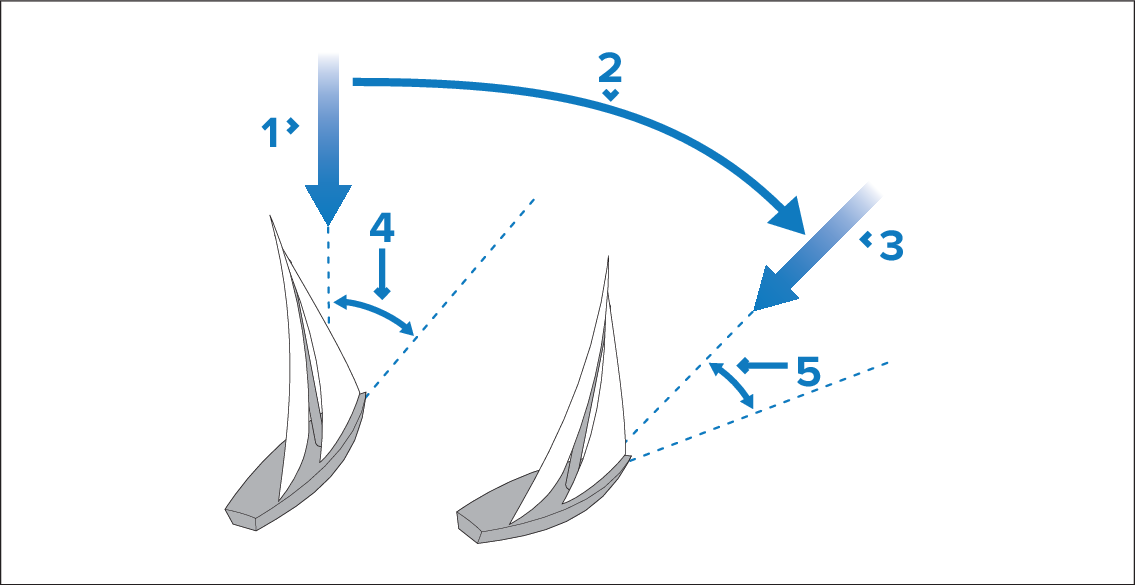
Initial wind direction
Wind shift
New wind direction
Relative wind angle
Vessel turns to maintain the same relative wind angle
You can only select Wind Vane mode if your autopilot is receiving suitable wind data.
True wind angleApparent wind angleAutopilots can maintain a course relative to either an Apparent or True wind angle. The default setting is Apparent wind. If required, you can change this to True wind from the Wind Type menu.