2D View
The 2D view includes a full compass dial and
data boxes for displaying information.
2D view
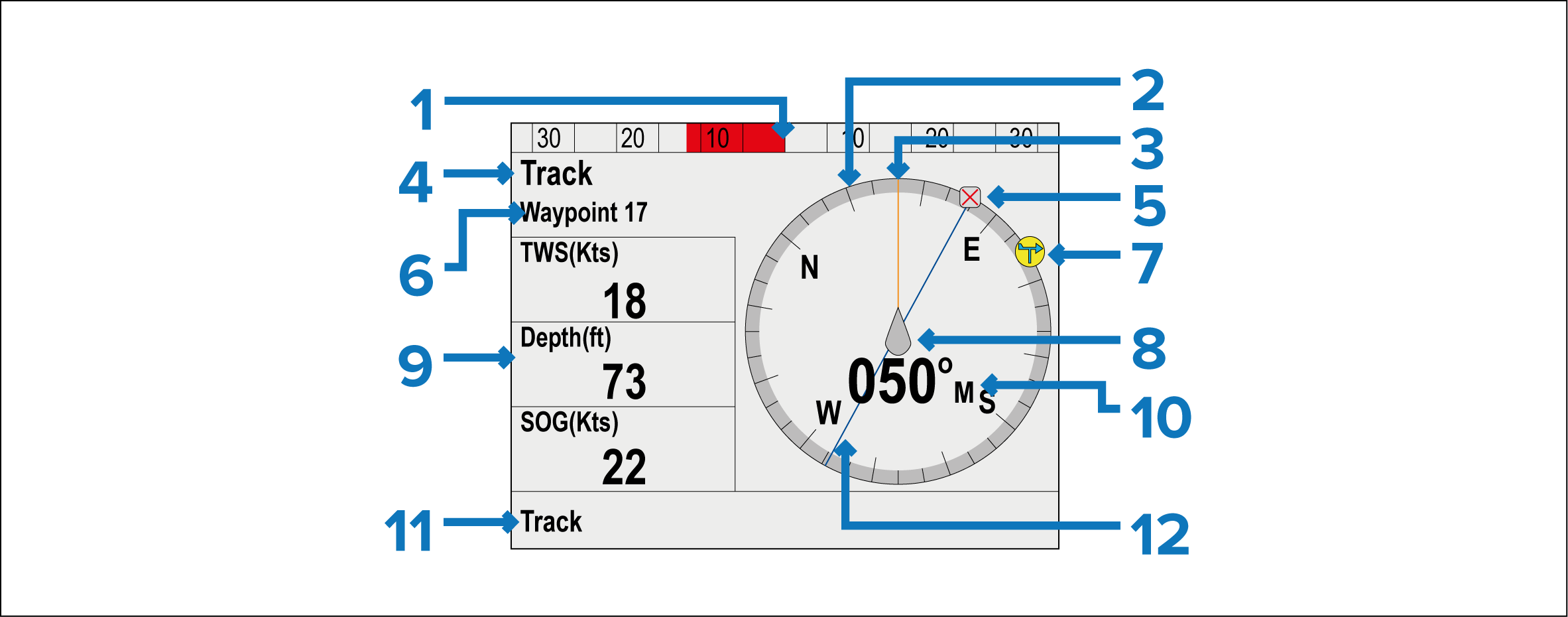
Rudder position
Compass
Heading line
Pilot Mode
Destination waypoint
Mode related info:
Current Heading (In Auto)
Destination waypoint name (In Track mode)
Locked wind angle (Wind vane mode)
Pattern symbol In Pattern mode)
Power Steer symbol (In Power steer mode)
Wind direction indicator
Vessel position indicator
Data boxes:
TWS (True Wind Speed)
Depth
SOG (Speed Over Ground)
NoteData items can be customized from the Pilot view menu:
Heading:
- Current heading — Standby and Power Steer mode.
- Locked heading — Auto , Wind Vane mode and Pattern mode.
Shortcut button (Left Soft button)
Track
Pattern
Wind Vane
Track line