Standard view
The Standard view provides large-sized heading
data combined with data boxes which provide further information.
Standard view
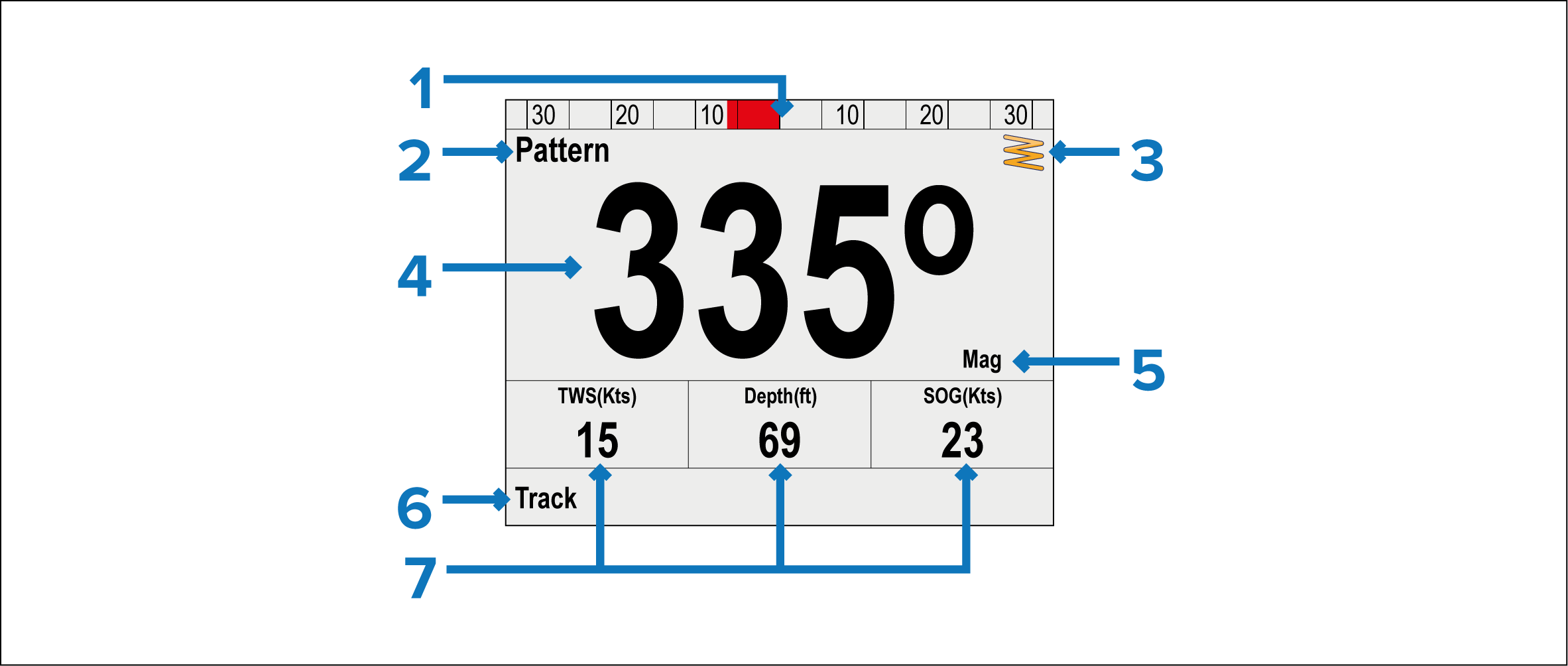
Rudder position
Pilot mode
Mode related info:
- Current Heading (In Auto)
- Destination waypoint name (In Track mode)
- Locked wind angle (In Wind vane mode)
- Pattern symbol (In Pattern mode)
- Power Steer symbol (In Power steer mode)
Heading:
Current Heading — (In Standby and Power steer modes)
Locked Heading — (In Auto, Track, Wind vane and Pattern modes)
Heading type (Magnetic or True)
Shortcut button (Left soft button):
Track
Pattern
Wind Vane
Data boxes:
TWS (True Wind Speed)
Depth
SOG (Speed Over Ground)
NoteData items can be customized from the Pilot view menu: