Using AutoTack in Wind Vane mode
The autopilot has a built-in automatic tack facility
(AutoTack) which turns your vessel "relative" to the wind
angle you're currently on, and then tacks the vessel to put you
on the opposite relative wind angle.
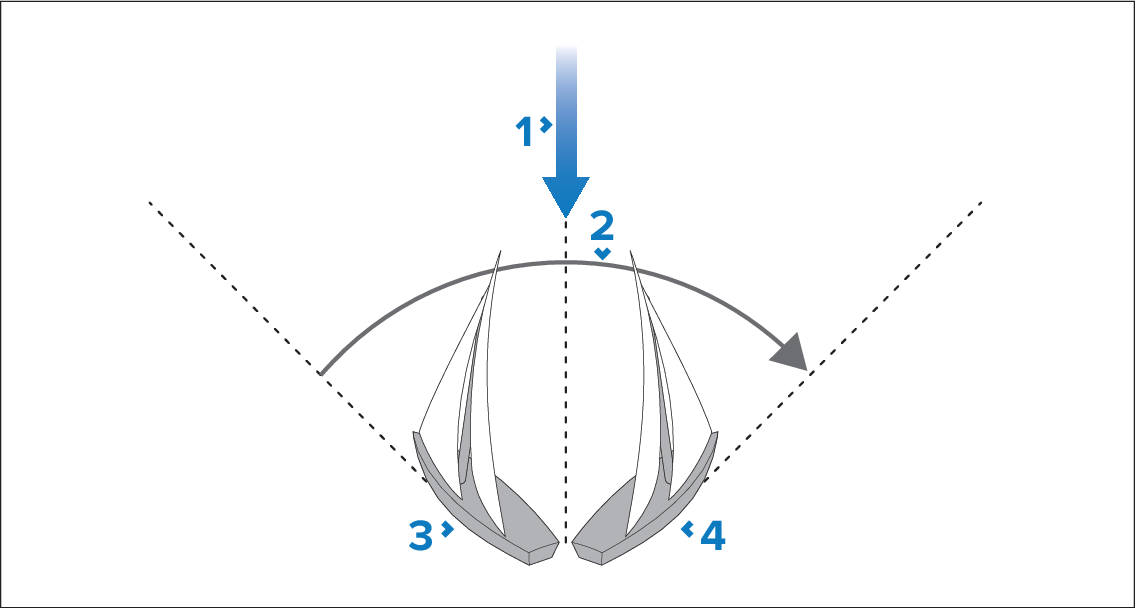
Starting position
Tack
Wind direction
Final position
AutoTackAutoTack is always relative to wind angle and is not adjustable.
In Wind Vane mode:
- Using a p70 / p70s:
- Press the -1° and -10° buttons at the same time to Tack to port.
- Press the +1° and +10° buttons at the same time to Tack to starboard.
- Using a p70R/ p70Rs:
- Select Tack Port from the main menu to Tack to port.
- Select Tack Starboard from the main menu to Tack to starboard.
When you AutoTack in Wind Vane mode, the vessel turns through the AutoTack angle. The autopilot will then trim the heading to mirror the locked wind angle from the previous tack.