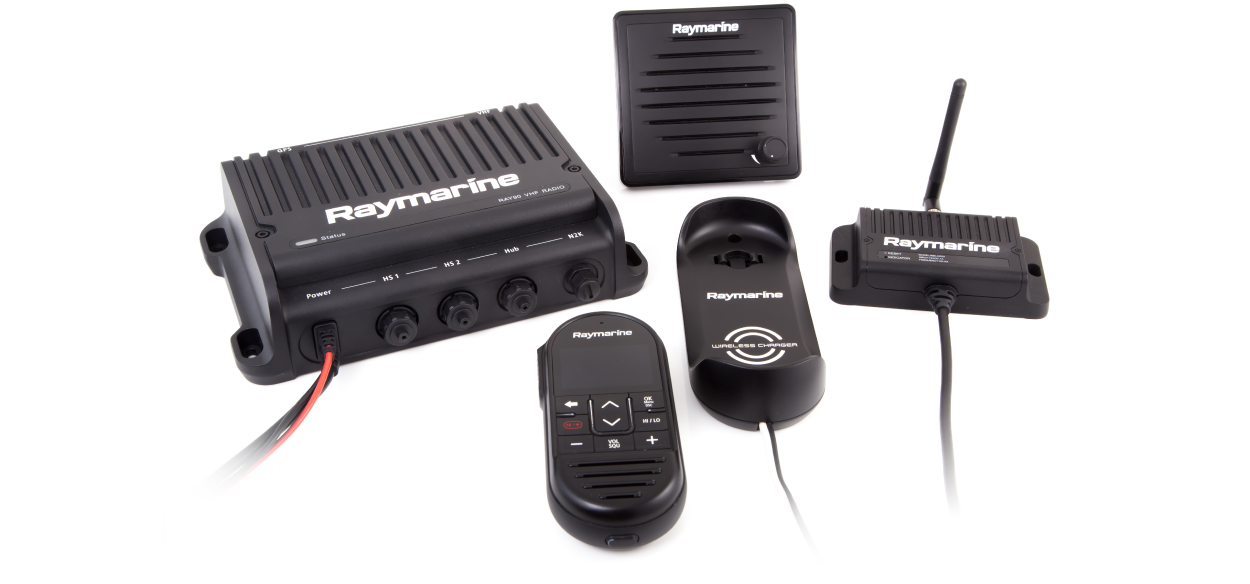
Ray90 / Ray91 Installation and Operations Instructions
Let’s Go!
How to navigate this document
Legal notices
Important information
Safety warnings
Certified Installation
Product installation and operation
Switch off power supply
Potential ignition source
Maximum Permissible Exposure (MPE)
Product warnings
12 Volt dc only
Chassis grounding
VHF Antenna isolation
Positive ground systems
FCC Warning (Part 15.21)
Perform regular radio checks
Ensure proper radio use
Regulatory notices
Compliance Statement (Part 15.19)
FCC Interference Statement (Part 15.105 (b))
IEEE and ICNIRP exposure limits
Innovation, Science and Economic Development Canada (ISED)
Innovation, Sciences et Développement économique Canada (Français)
Licensing
Water ingress
Disclaimer
Declaration of Conformity
PSTI Compliance
Product disposal
Warranty policy and registration
Technical accuracy
Publication copyright
Document and product information
Applicable products
Applicable software version
Product documentation
SeaTalk NG documentation
Printed (hardcopy) product manuals
Document illustrations
Document conventions
Product and system overview
Product overview
Required additional components
Optional wired components
Extension cables
Optional wireless components
Compatible MFDs / Chartplotters
Incompatible Raymarine MFDs / Chartplotters
Software updates
Installing software updates
Checking software versions
Ray90/Ray91 software
Performing software updates — Raymic handset
Licensing
VDES, IRR 2020 and BIPT Requirements
VDES Overview
VDES applicability
VDES and IRR 2020 requirements
BIPT Requirements (Belgium only)
Licensing
USA licensing requirements
Canada licensing requirements
Europe licensing requirements
Rest of World licensing requirements
Additional information — Ray90 / Ray91
Additional information - wireless handset
Additional information - wireless charging holster
Additional information - wireless hub
Additional information - wireless speaker
Obtain MMSI (Maritime Mobile Service Identity) number
MMSI entry
Automatic Transmitter Identification System (ATIS)
Parts supplied
Parts supplied
Product dimensions
Product dimensions — Base station
Product dimensions — speakers
Product dimensions — Wired handset (Raymic)
Product dimensions — Wireless hub
Product dimensions — Wireless handset and holster
Location requirements
Warnings and cautions
Potential ignition source
General location requirements
Ventilation requirements
Mounting surface requirements
Cable routing requirements
Electrical interference
Power supply
RF interference
Compass safe distance
EMC installation guidelines
Suppression ferrites
Connections to other equipment
GNSS (GPS) location requirements
Antenna mounting and EME exposure
Multiple antenna installations
Loud hailer location requirements
Wireless product location requirements
Wireless location requirements for optimum performance
Pre-installation site survey
Cables and connections — General information
General cabling guidance
Cable types and length
Cable routing and bend radius
Strain relief
Circuit isolation
Cable shielding
Connections to other equipment
Dust caps
Bare-ended wire connections
Connections overview
Mounting
Tools required
Mounting the Base station
Wired and wireless speaker mounting
Wired handset mounting using the holster
Pass-through panel kit mounting
Mounting the wireless hub
Antenna orientation
Installing the wireless hub antenna extension accessory
Mounting the charging holster for the wireless handset
Network connections
Connections overview
Handset station connection
Connecting handsets and cables
Wired handset extension cables
Wired speaker connection
Connecting GNSS (GPS) and VHF antennas
Wireless hub connection
Wireless handset connections
NMEA 0183 connection
NMEA 0183 connection
NMEA 2000 connection
NMEA 2000 / SeaTalk NG connection
Connecting SeaTalk NG cables
Loud hailer connection
Loud hailer connection
Power connections
Power connection
In-line fuse and thermal breaker ratings
12 Volt dc only
Positive ground systems
Grounding not required
Chassis grounding
Power distribution
Power cable extension (12 V systems)
Wireless handset charging holster – power connection (Ray63 / Ray73 only)
In-line fuse and thermal breaker ratings
Wireless speaker – power connection (Ray63 / Ray73 only)
In-line fuse and thermal breaker ratings
Getting started
Licensing
General radio operating rules
Handset controls
Wireless speaker controls
Powering the Base station
Powering the handset
Homescreen overview
Status bar symbols
Main menu overview
Dealer set-up menu options
Multiple station operation
Adjusting Brightness and Contrast
Shared Brightness
Enabling Shared Brightness
Initial set up
Selecting a language
Switching on the AIS receiver
Selecting a network type
Entering your MMSI number
MMSI and ATIS ID entry
Entering your ATIS ID
MMSI and ATIS ID entry
Enabling and disabling ATIS mode
Changing the radio region
Switching between high and low transmit power
GNSS (GPS) set up
Enabling and disabling the internal GNSS (GPS)
GNSS data source
Manual GPS source missing or no position data
Entering position manually
Selecting (GNSS) GPS information to display
Setting time format and offset
Wireless handset stations
Wireless handsets
Retain a wired handset station
Wireless handset charging
Connecting a wireless handset to the hub
Checking the Wireless hub's password
Changing your wireless hub's password
Changing the hub's wireless channel
Connecting the wireless speaker to the Wireless handset
Disconnecting a Wireless speaker
Wireless set-up menu options
Wireless hub set-up menu options
Wireless handset not connected menu
Digital Selective Calling (DSC)
Digital Selective Calling (DSC)
Distress calls
Making a designated distress call
Making a Distress call
Making a Mayday call
Cancelling a distress call before transmission
Cancelling a distress call after transmission
Receiving a distress call
Ignoring a distress call
Acknowledging a distress call
Manually relaying a distress call
Distress relays sent by other stations
Acknowledging a distress relay sent to your vessel
Urgency calls
Making an urgency call
Receiving an urgency call
Safety calls
Making a safety call
Receiving a safety call
Individual (routine) calls
Making an Individual call
Receiving an Individual call
Group calls
Making a group call
Receiving a group call
Position requests
Making a position request
Responding to a position request
Setting automatic response to position requests
Phonebook
Adding a Phonebook entry
Editing a Phonebook entry
Deleting a Phonebook entry
Call logs
Accessing the call logs
Test calls
Making a Test call
Receiving a test call
DSC set-up menu options
VHF operations
Watch modes
Setting Watch mode
Scan Mode
Setting Scan mode
Priority channels
Switching between priority channels
Setting a second priority channel
Sensitivity
Switching sensitivity modes
Private channels
Selecting a private channel set
Automatic Transmitter Identification System (ATIS) and Marcom-C mode
Enabling and disabling ATIS mode
AIS receiver
Switching AIS on and off
Set-up menu options
Display Set-up menu
Shared Brightness menu
Hailer, Fog horn, and Intercom
Hailer Fog Intercom menu
Loud hailer
Using the hailer
Fog horn
Using the fog horn in manual mode
Using automatic fog horn modes
Switching off Fog Horn mode
Intercom
Using the intercom
Responding to the intercom
Maintenance
Maintenance
Routine checks
Product cleaning
Unit cleaning instructions
Troubleshooting
LED diagnostics — Ray90 / Ray91 Base station
LED diagnostics — Wireless (Active) speaker
Troubleshooting
Performing a system reset
System test
Checking for RF interference
Multiple antenna installations
Power up troubleshooting
Audio troubleshooting (transmission / reception)
Passive speaker troubleshooting
GNSS (GPS) troubleshooting
DSC troubleshooting
Obtain MMSI (Maritime Mobile Service Identity) number
AIS troubleshooting (Ray70 / 73 / 91 only)
Wired handset troubleshooting
Wireless troubleshooting (Ray63 / 73 / 90 / 91 only)
Technical support
Raymarine technical support and servicing
Viewing product information
Learning resources
Technical specification
Technical specification — Base station
Technical specification — Wired handset (Raymic)
Technical specification — Wired (Passive) speaker
Technical specification — Wireless hub
Technical specification — Wireless handset
Technical specification — Wireless handset charging holster
Technical specification — Wireless (Active) speaker
Radio usage
Spares and accessories
Ray90 / Ray91 spares
Extension cables
Accessories
SeaTalk NG cables and accessories
NMEA 0183 sentences
NMEA 2000 PGN list
Licensing and MMSI issuing authorities
VHF Channels
Phonetic alphabet
Prowords