Ray90 / Ray91 Installation and Operations Instructions

Ray90 / Ray91 Installation and Operations Instructions

Main menu overview

    81377 - Rev 10 - en-US

    Main menu overview

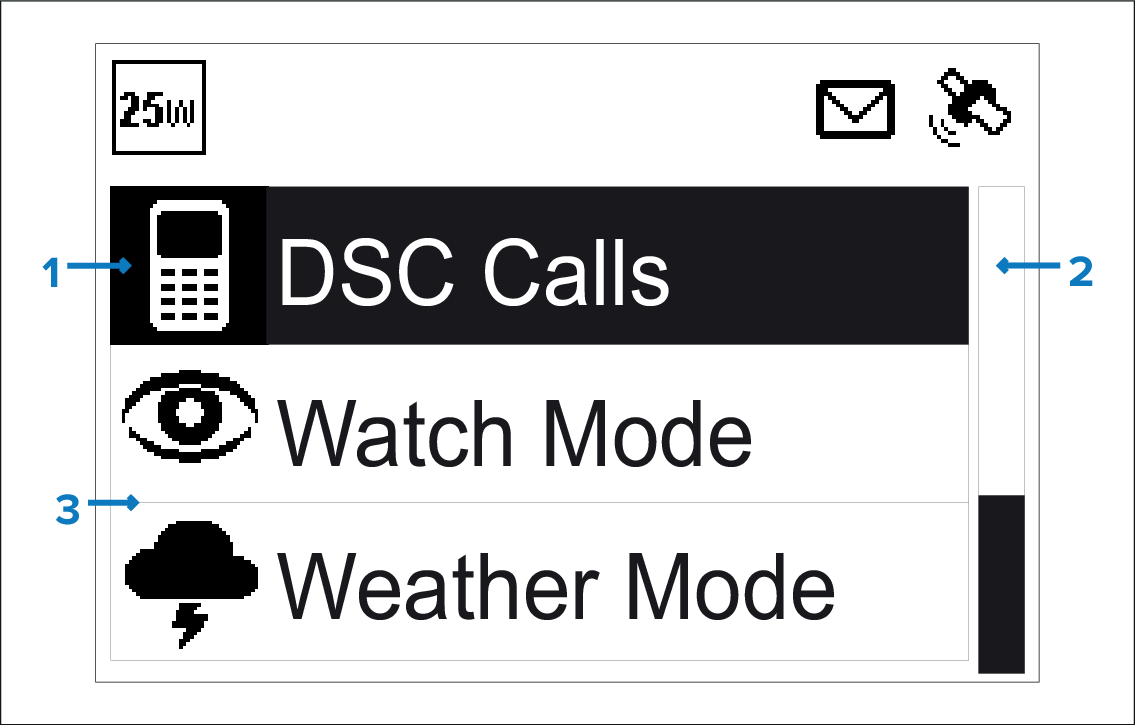
    The main menu is accessed by Pressing the OK button from the Homescreen.
    1. Currently selected menu item

    2. Scroll bar

    3. Menu items

    MenusMain menuThe main menu includes the following items:

    Symbol

    Name

    Sub-options

    * DSC Calls

    • Individual call

    • Distress call

    • Position request

    • Group call

    • All ships call

    • Phonebook

    • Call logs

    • Test call

    • DSC set-up

    * Watch Mode

    • Dual watch

    • Triple watch

    • 2nd priority channel

    * Weather Mode

    • Weather Homescreen

    * Scan Mode

    • All channels

    • All channels + 16

    • Saved channels

    • Saved channels + 16

    • Edit saved channels

    ** Hail/Fog/Intercom

    • Hailer

    • Fog horn

    • Intercom

    ** Hailer/Fog horn

    • Hailer

    • Fog horn

    ** Intercom

    • Intercom

    Set-up

    • Display set-up

    • Language

    • Units

    • Power output

    • Sensitivity

    • Noise cancelling (Tx)

    • ** Wireless set-up

    • Handset name

    • Key beep

    • Channel set-up

    • Weather alerts

    • GPS set-up

    • DSC set-up

    • AIS

    • Network output

    • ATIS set-up

    • Maintenance

    Note

    * These menu items are not available when the radio has ATIS enabled, or if the radio has been pre-programmed in MARCOM-C mode.

    ** These menu items are only available when compatible accessories are connected to the radio.

    Contents
    1. Dealer set-up menu options
      With authorised Dealer hardware connected the Dealer set-up menu will be available from the Main menu.
    Parent topic: Homescreen overview
    Previous topic: Status bar symbols

    © 2025 Raymarine UK Ltd. All rights reserved.
    Cookie Policy Privacy Policy