Responder settings
The Responder settings menu is only available when First responder has been selected as the Boating activity during step 2 of the display’s initial startup wizard. The Responder settings menu includes settings for STEDS specific features, which require an AIS5000 to be connected to the system. If the system does not detect an AIS5000 these features will not be available.
SettingsResponderResponder settings can be accessed from the Settings menu: .
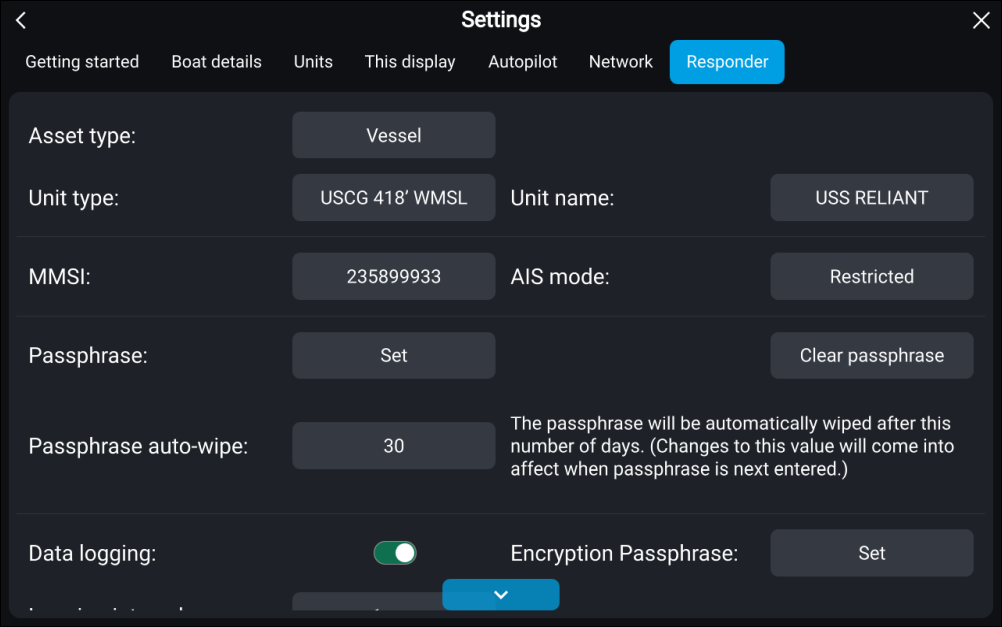
First respondersetupResponderSettings
Unit details
First responder Asset typeAsset type — Select either Vessel or Aircraft.
First responder Unit typeUnit type — Select unit type from the list.
First responder Unit nameUnit name — Enter your unit name (this option is the same as the Boat name option available in the Boat details settings menu).
The unit type and asset type settings will synchronize and set the same values on a STEDs compliant AIS transceiver e.g.: Raymarine’s AIS 5000.
MMSI / AIS
First responder MMSIMMSI — Set your vessel’s MMSI number.
ImportantIn the United States of America (USA), the MMSI and Static Data must be entered only by a Raymarine® dealer or other appropriately qualified installer of marine communications equipment for marine vessels. In the USA, the user is NOT authorized to do this.
In Europe and other parts of the world outside of the United States of America, the MMSI can be set up by the user.
For further details, refer to the relevant Telecommunications Regulatory Body for your region.
First responderAIS modeAIS mode — Determines the transmit/receive mode of STEDS AIS hardware. For details see: First responder AIS modes
STEDS passphrase
First responder PassphrasePassphrase — Enter the designated passphrase your team / organization is using to transmit and receive STEDS messages.
Clear passphrase — Deletes the entered passphrase.
Passphrase auto-wipe — Passphrase expiry. Set the number of days before the passphrase is automatically deleted (the passphrase will be wiped at 00:00 UTC).
Data logging
First responder Data loggingData logging — Enables and disables Data logging.
Logging interval — Time interval between recording data.
Save to: — Select the card slot to use for Data logging.
Password protection
First responder Password protectionCritical settings — Activate / De-activate — When activated critical settings cannot be changed without entering the password.
First responder Password protectionApproved routes — Activate / De-activate — When activated approved routes cannot be modified or deleted without entering the password.
Advanced
First responder OneShot TOI settingsFIDThe following Advanced setting can be accessed from the From the Advanced set-up menu:
TOI OneShot settings For details refer to: TOI OneShot settings
FID and checksum settings For details refer to:: STEDS messaging transmission FIDs and checksums
NMEA 2000 messages For details refer to: NMEA 2000 messages
Inbox message retention For details refer to: Inbox message retention
Round patterns to nearest 0.1 nm — Enabling Round patterns ensures that SAR patterns appear the same on both broadcaster and recipient MFDs. This setting is disabled by default.
ImportantSAR patterns are broadcast at a 0.1 nm resolution. If you intend to broadcast a SAR pattern ensure that Round patterns is enabled before the SAR pattern is created.
Operate in Secondary SMC behavior. For details refer to: Act in secondary mode