Message inbox
The inbox stores all sent and received messages.
Message inboxThe transmission type is identified on the right side of the message. If a secure message has a Link ID then this will also appear on the right side of the message.
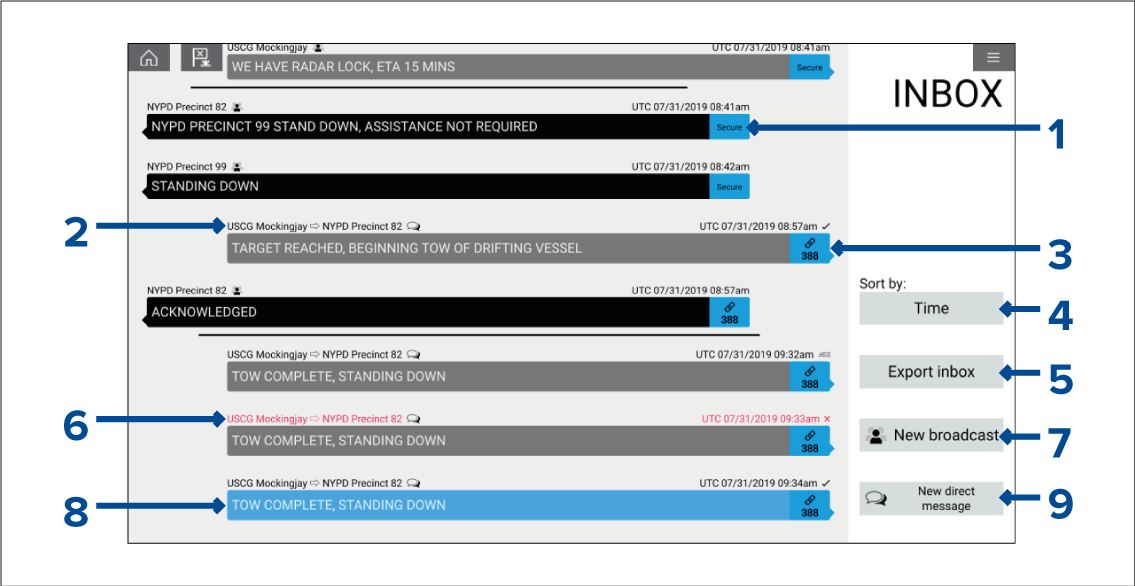
MessagesReceivedReceived messages appear on the left side of the screen.
When a message is acknowledged, a tick is displayed after the date and time.
MessagesSentSent messages appear on the right side of the screen.
MessagesSort bySort by — The inbox can be sorted by time or by Link ID. The sort by option in not available when the inbox is filtered.
MessagesExportExport inbox — Exports the current view / filter of messages to a .CSV (Comma Separated Values) spreadsheet file to a memory card inserted in the MFD’s card reader. The Export inbox option is only available when a memory card is present in the MFD’s card reader.
If a message has not been acknowledged, the text above the message will be displayed in red and an ‘x’ is displayed after the date and time.
MessagesNew broadcastNew broadcast — Select to send a broadcast to all responder vessels.
Currently selected message is highlighted.
MessagesNew direct messageNew direct message — Select to send a direct message to a specific responder vessel.
The date and time provided for each inbox message is the last modified date, and may not be same as the date and time each message was originally created or received.
Messages are removed from the inbox after a specified retention time.
Filtering
The inbox can be filtered to show only related messages or to show only messages from/to a specific sender. To filter the list of messages, select an inbox message and select either View messages from/to this sender or View related messages.
Inbox message retention
Inbox message retention can be set from 1 to 30 days. The inbox message retention can be set from the Responder Advanced set-up menu: