First responder AIS modes
With compatible STEDS AIS hardware connected the mode of the AIS hardware can be set from the MFD.
The AIS modes can be viewed and changed from the Status area in the Homescreen. Select the Status area and then select AIS to display and select available modes.
The AIS mode of the connected STEDs compatible AIS hardware will automatically be updated to match the selected mode.
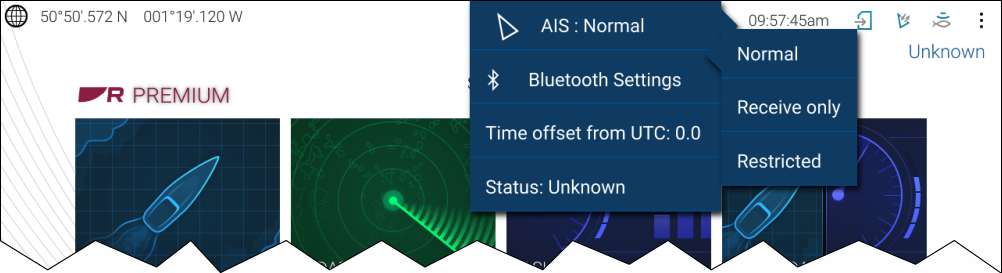
The following AIS modes are available:
First responderAIS modeNormal — In this mode your AIS hardware will receive and transmit AIS messages and encrypted AIS messages.
Receive only — In this mode your AIS hardware receives AIS messages and encrypted AIS messages, but transmits nothing (maintaining radio silence).
Restricted — In this mode your AIS hardware will receive AIS messages and encrypted AIS messages, but only transmits encrypted AIS messages (no AIS messages are transmitted). This means vessels with ‘standard’ AIS receivers / transceivers will not be able to detect Blue Force vessels.
The AIS mode can also be changed from the AIS Settings menu: and from the Homescreen settings menu: . AIS mode
AIS mode replaces the Silent mode option available on non-STEDS First responder configurations.