OEM Commissioning
Equipment installers who need to configure multiple boats with the same configuration can set up an initial boat and then save an “OEM install file” to a memory card. The OEM install file can then be imported to subsequent boats which require the same configuration.
OEM CommissioningOEM install fileThe OEM install file will save the following settings:
Boating activity (e.g.: Sailing, Cruising etc.).
Homescreen apps, app page layouts and app page names.
Homescreen third- party hardware integration shortcut icons.
Homescreen icon mode.
Current active profile.
Basic boat details, such as: Minimum safe height, Minimum safe width, Minimum safe depth, number of engines, number of tanks and tank size.
App data overlay databoxes.
Dashboard app pages and customized data items.
Unit of measure selections (e.g.: depth units, speed units etc.).
User interface language.
Once an OEM install file has been imported, any MFD apps which require further configuration (e.g.: the Fishfinder app’s transducer and sonar channel selection) will include a configuration warning symbol on the Homescreen app page icons, as shown below:
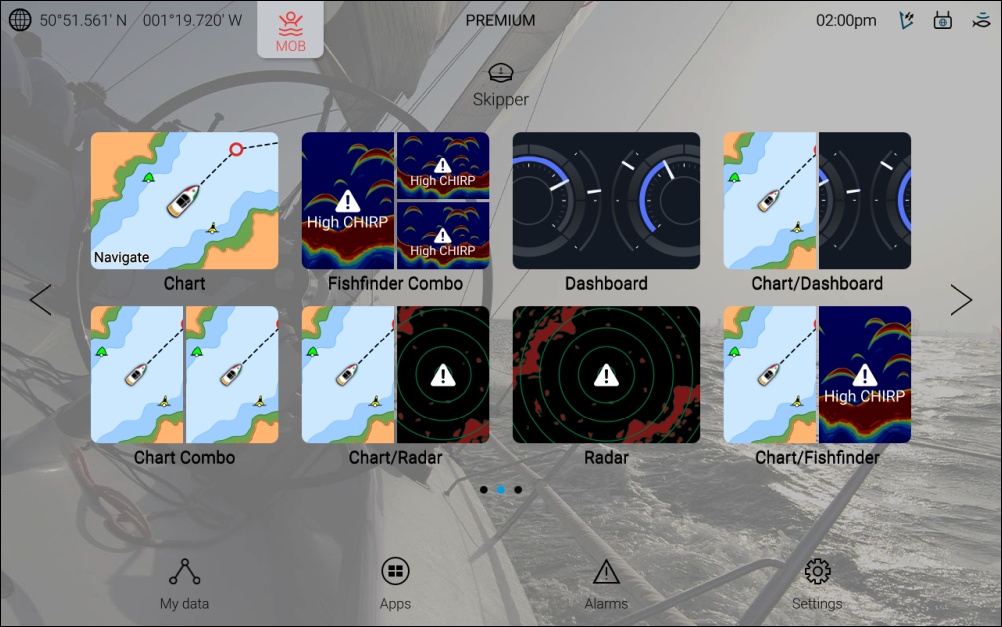
As part of the OEM install process, a factory reset will be performed.
MFD apps which have a hardware dependency (such as the Fishfinder, Radar and Camera apps) will require hardware and/or channels to be selected manually for each instance of the app.
Chart app mode and cartography selection is not saved.