Chart orientation
The orientation setting determines how the chart is orientated in relation to you vessel’s direction of travel.
Chart Chart orientationThe following chart orientations are available:
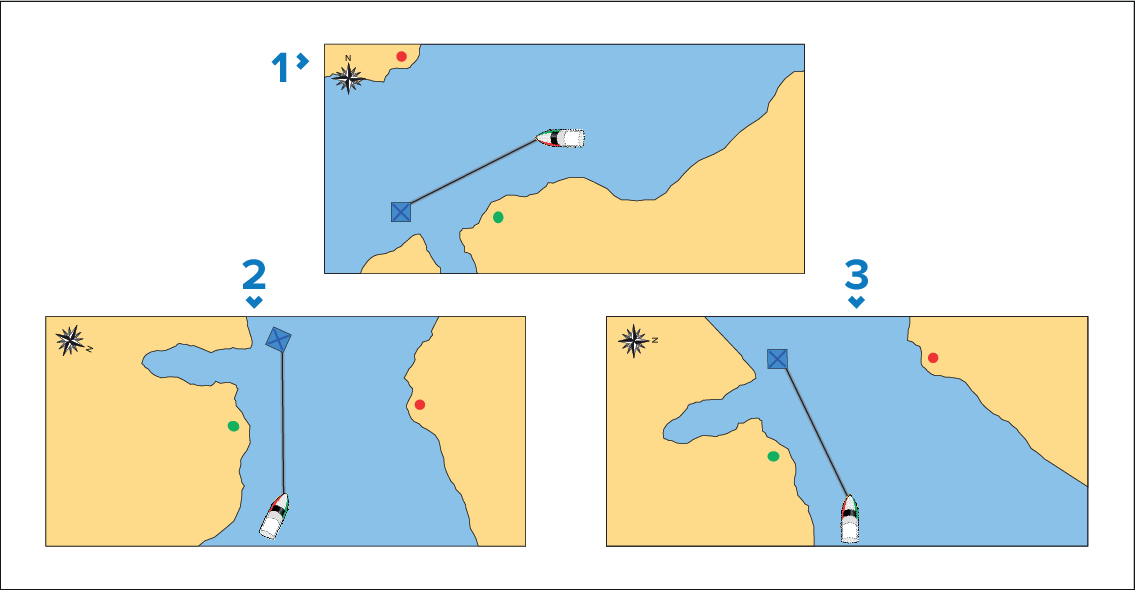
Chart North-upNorth-up — The chart is orientated so that true north is always upward on the screen. As your vessel changes direction, vessel icon rotates accordingly to show your relative position to true north North up is the default chart orientation.
Chart Course-upCourse-up — The chart is orientated so as to show your current course directly ahead of your vessel icon. The chart will rotate so that your COG is always upward on the screen.
Chart Head-upHead-up — In Head-up mode the vessel’s heading always points directly up. As your heading changes the chart rotates accordingly. In Head-up mode if heading data is not available then stable COG is used instead. If heading or COG is not available then Head-up mode is suspended and the chart will orientate to display 0 degrees directly up if there is no active navigation or Course-up if there is active navigation.
NoteTo prevent constant rotations as the vessel yaws the chart will not update unless the heading changes by at least 10 degrees from the last displayed orientation.
Head-up mode is not available when chart motion is set to True motion.