Boat icon pop-over options
The boat icon pop-over options provide access to boat-related settings.
Chart appBoat iconboat options
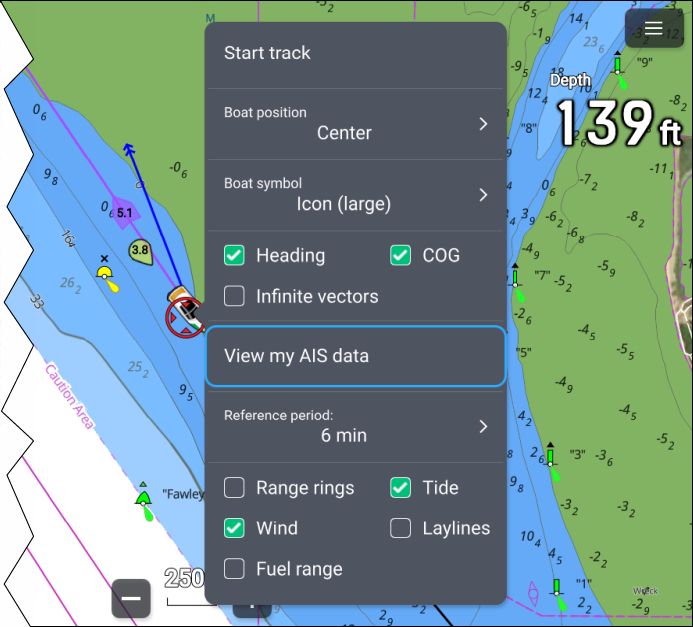
From the boat icon pop-over options you can:
Start or stop recording a track, by selecting Start/track / Stop track.
Change the boat symbol’s position, by selecting a Boat position option.
Change the symbol used to represent your boat, by selecting a Boat symbol option.
Show or hide boat heading vector line, by ticking or unticking the Heading tick box. By default, the heading vector length is determined using STW (Speed Through Water) received from a speed transducer; you can use SOG instead by enabling the Use SOG for hdg vector length from the Advanced settings menu: .
Show or hide boat COG vector line by ticking or unticking the COG tick box.
Use infinite or reference period line length for vectors by ticking or unticking the Infinite vectors tick box.
View your own boat’s AIS data by selecting View my AIS data.
Set the length of vectors when not using Infinite vectors by selecting a Reference period option. Vector length is measured in minutes and shows your expected position after the selected time has elapsed.
Show or hide range rings around your boat by ticking or unticking the Rng rings tick box.
Show or hide the tide vector graphic by ticking or unticking the Tide tick box.
Show or hide the wind vector graphic by ticking or unticking the Wind tick box.
Show or hide layline graphics by ticking or unticking the Laylines tick box. The Laylines option is only available when your MFD has been configured using the Sailing boat activity.
Show or hide the Fuel range ring (for Combustion engines) or Battery range ring (for Electric motors).
In weather mode and fishmapping mode, the only option available is Start/track / Stop track.
Chart mode-specific behavior
Depending on the chart mode in use, some options are enabled by default:
Tides mode — Heading, COG and Tide.
Anchor mode — COG, Tide and Wind.
Racing mode — Heading, COG, Tide, Wind and Laylines.
Navigate mode — Laylines, when your MFD has been configured using the Sailing boat activity.
Boat pop-over options are saved for each chart mode in the current chart app instance.