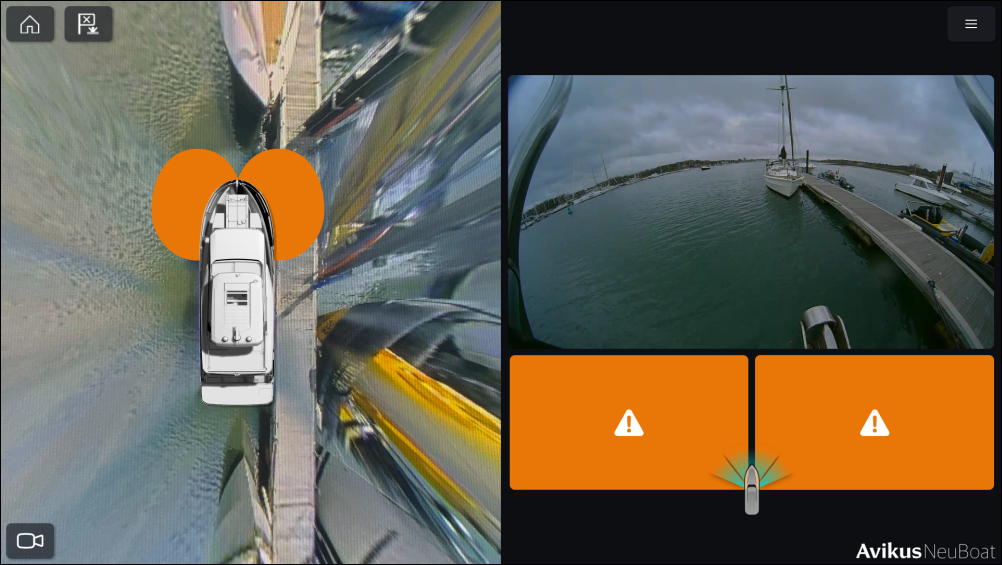
When a camera fault is present, the relevant camera streams
will be flagged via the multifunction display’s NeuBoat Dock app,
with warning icons indicating where the fault has been detected.
TroubleshootingTroubleshootingCamera
Camera fault detected in NeuBoat Dock app
Possible causes
Possible solutions
Camera lost connection.
Check the relevant product, network cabling and connections
for signs of damage or corrosion, and replace if necessary.
Camera internal fault.
Ensure the affected camera(s) have been installed and connected
in accordance with Raymarine’s recommendations in the NeuBoat Dock
Installation instructions (87480) document, as appropriate. If
this error is persistent, your installation will need to be reviewed
by your dealer / installer.
Camera feed views do not appear in the correct position
Possible causes
Possible solutions
Camera connected to the wrong input channel.
For information on which input channel your cameras must be
connected to, refer to the ‘SVM camera input channels’ section
within the NeuBoat Dock Installation Instructions (87480) document.