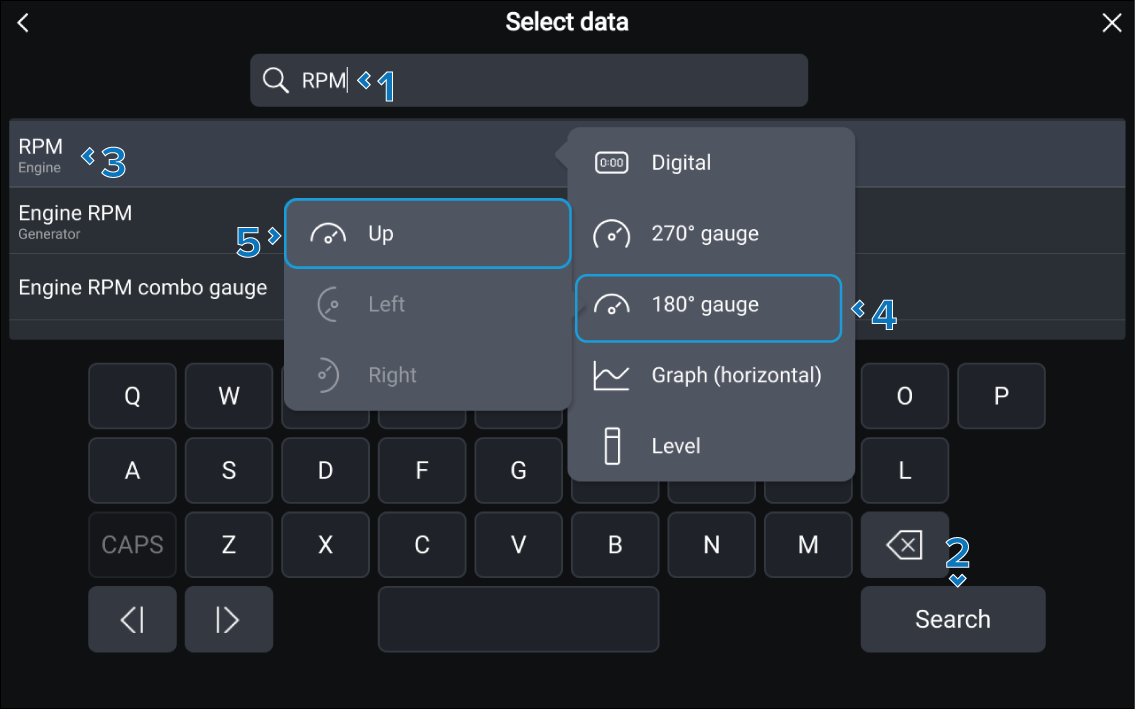
You can search for a data item from the Select
data menu.
Display dataData item searchThe Select data menu is displayed
when you have selected Edit, Edit data, or Data item from the relevant data item’s pop-over
menu.
With the Select data menu displayed:
Use the onscreen keyboard to enter the name, or part of
the name for the data item you are looking for.
As you type the results will start to appear.
Select the Search button, or scroll
the results list.
Select the desired data item.
Alternatively select the Search button
to remove the keyboard and see the full list of results.
Note
If multiple instances of the data item exist you will also need
to select the source for the data item.
Select the widget type, where applicable.
Select the widget orientation, where applicable.
The data item will be displayed in the selected data cell.