Motor page
The motor page is designed to provide data received from supported electric motor system(s). When Electric is selected as the Propulsion system during the chartplotter’s initial start up wizard, the motor page will be included as a default page.
Data appMotor pageThe motor page can display data for up to 2 motors. The number of motors displayed on the default motor page is based on the number of motors selected during the chartplotter’s initial start up wizard.
If your chartplotter is configured with 2 motors, you can add new motor pages which display the data for up to 2 motors (for example, you could add new pages which show each motor independently).
You may need to edit the Gear data item and the Power gauge to reflect the correct motor.
Motor page overview
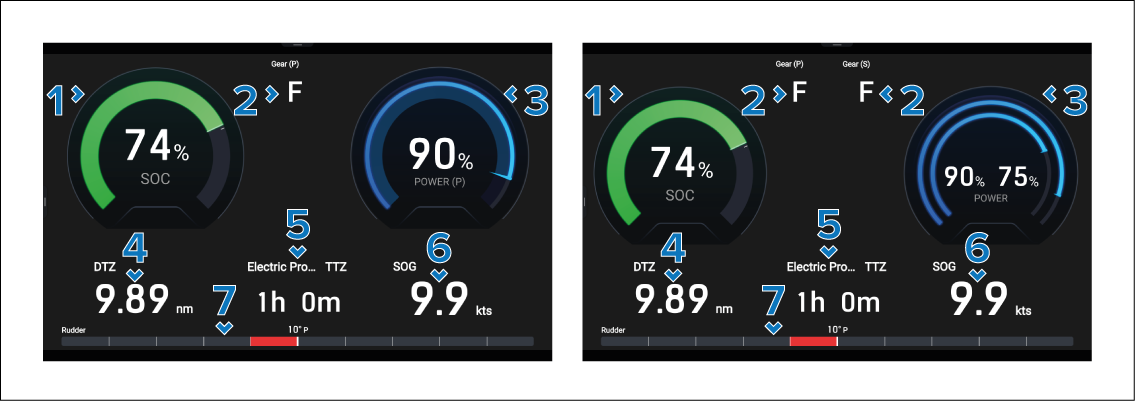
Description |
|
|---|---|
1 |
SOC gauge — The current State Of Charge of the motor batteries. |
2 |
Gear — Current motor’s transmission gear. |
3 |
Power gauge — The current power output of the motor(s). |
4 |
DTZ Distance To Zero — The distance that can be travelled under current conditions before the batteries reach zero charge. |
5 |
Electric Propulsion TTZ Time To Zero — The amount of time it will take under current conditions before the batteries reach zero charge. |
6 |
SOG — Speed Over Ground |
7 |
Rudder indicator bar — Indicates rudder position. |
For instructions on creating an motor page, refer to: Creating a motor page