System information page
The System information page provides settings and information related to the system and network .electronic regulatory labels (E-Labels) are also available.
The System information page is the first page that is opened when the SETUP button is selected from the LIVE VIEW page. The System information page can also be accessed by selecting: in the Navigation pane.
The System information page includes the following expandable sections:
System informationSystem information section
Network information section
E-Label section
System information section
User interfaceSystem information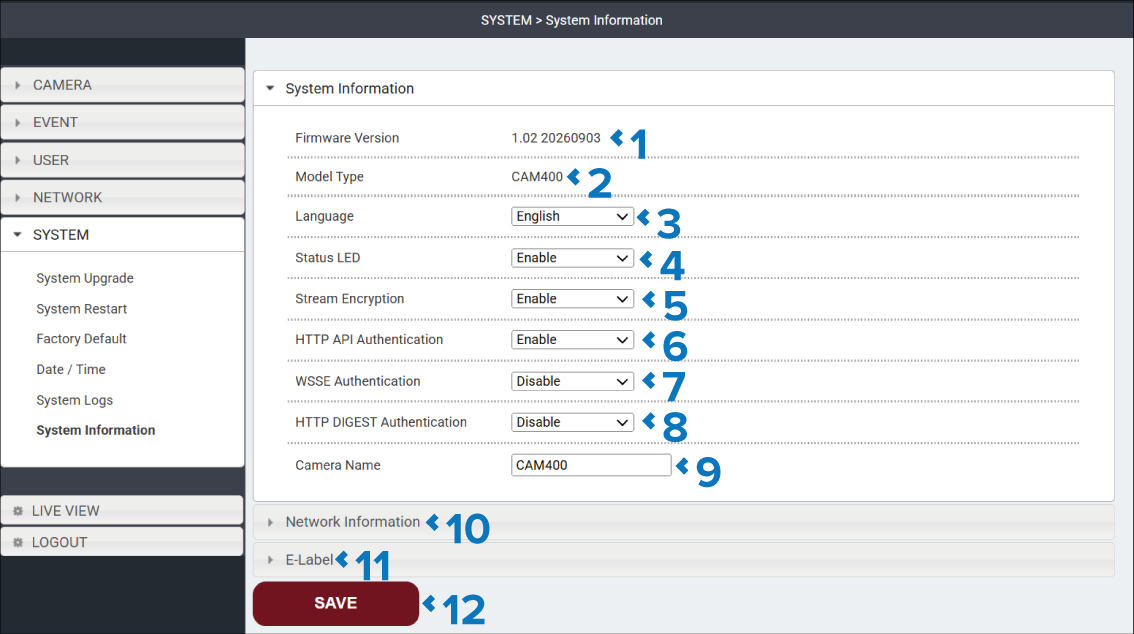
Description |
|
|---|---|
1 |
Firmware Version The camera’s current firmware version is displayed |
2 |
Model Type The camera’s model is displayed. |
3 |
Language drop down Select the language that you want the user interface to use. The user interface language will change once the SAVE button is selected. |
4 |
Status LED drop down Enable or Disable the camera’s status LED. |
5 |
Stream Encryption Enable or Disable encryption of the camera’s video streams. Enabling Stream Encryption prevents unauthorized access and network packet capture. |
6 |
HTTP API Authentication Enable or Disable HTTP API authentication. Control whether applications can access and control the camera through its HTTP-based API. Important Disabling this setting will prevent access to the user interface via the chartplotter. |
7 |
WSSE Authentication Enable or Disable WSSE Authentication. Control whether the camera uses a cryptographic password digest in place of the normal password. Important Enabling this setting prevents the camera from being detected by compatible chartplotters. Access to the camera's user interface is also blocked unless the client device has been specifically configured to use WSSE authentication. |
8 |
HTTP DIGEST Authentication Enable or Disable HTTP DIGEST Authentication. Control whether the camera uses a challenge-response exchange for authentication. Important Enabling this setting prevents the camera from being detected by compatible chartplotters. Access to the camera's user interface is also blocked unless the client device has been specifically configured to use HTTP DIGEST authentication. |
9 |
Camera Name The default name is CAM400, you can assign a more meaningful name to help identify the camera on your network. This setting does not impact the camera name displayed on chartplotters. The camera can also be assigned a meaningful name from the Network settings menu and the Video app settings menu on your chartplotter. |
10 |
Network Information heading Select to view the Network Information section. |
11 |
E-Labels heading Select to view the E-Labels section. |
12 |
SAVE button Select the SAVE button to save any changes you have made before leaving the page. |
Network information section
User interfaceNetwork information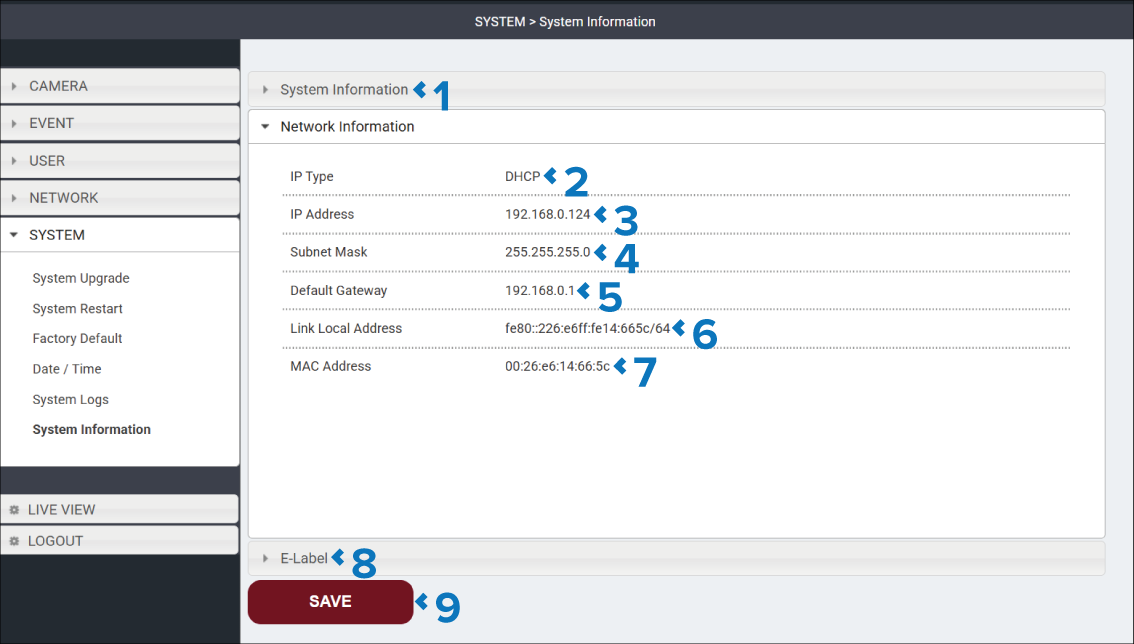
Description |
|
|---|---|
1 |
System Information heading Select to view the System Information section. |
2 |
IP Type Identifies if the IP address has been assigned via a DHCP server or has been manually assigned a Static IP address. |
3 |
IP Address Identifies the camera’s current IP address. |
4 |
Subnet Mask Identifies the networks subnet mask |
5 |
Default Gateway Identifies the IP address of the network’s default gateway. |
6 |
Link Local Address Identifies the camera’s IPV6 Link Local Address. If IPv6 is enabled on the client, the Link Local Address is always present, even if the camera has not obtained an IPv4 address from the DHCP server. |
7 |
MAC Address Identifies the camera’s unique MAC address. |
8 |
E-Labels heading Select to view the E-Labels section. |
9 |
SAVE button Select the SAVE button to save any changes you have made before leaving the page. |
E-Label section
User interfaceE-Label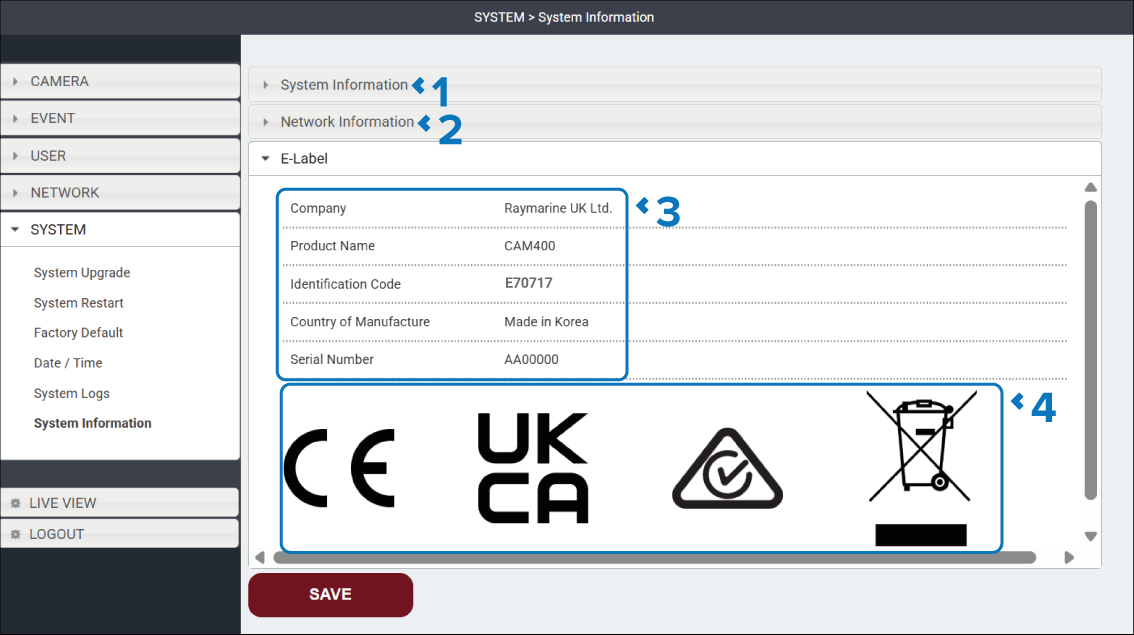
Description |
|
|---|---|
1 |
System Information heading Select to view the System Information section. |
2 |
Network Information heading Select to view the Network Information section. |
3 |
Product identification Details related to product identification. |
4 |
Product markings Logos for applicable regulatory compliance / approvals. |