RTSP
The RTSP page is used to view and configure the camera’s RTSP streams.
The RTSP page is accessed by selecting: in the Navigation pane.
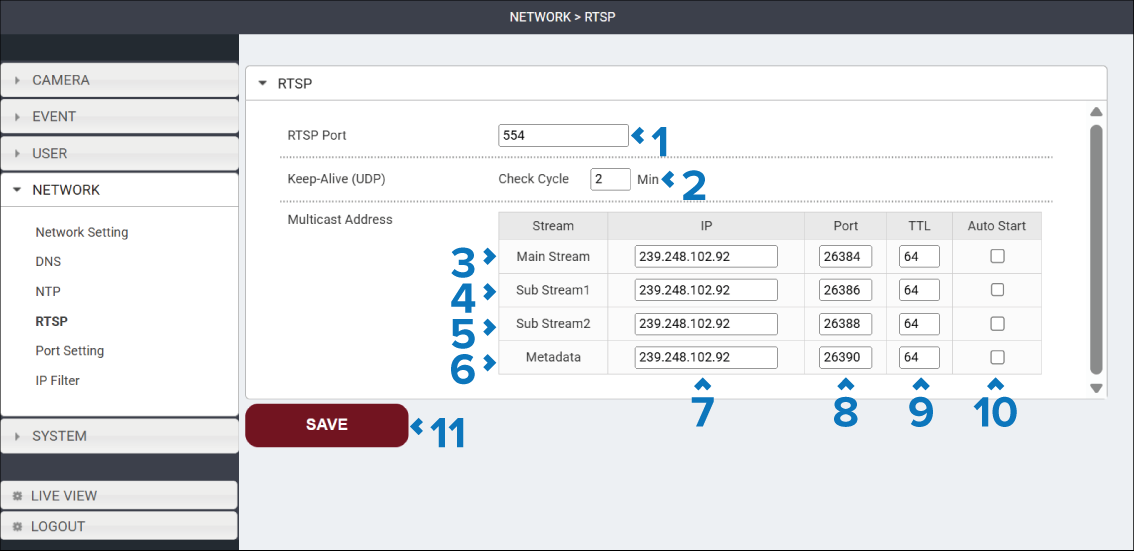
Description |
|
|---|---|
1 |
RTSP Port field Specifies the TCP / UDP port used for Real Time Streaming Protocol (RTSP) communications. The default port is 554. |
2 |
Keep-Alive (UDP) field Specifies how often (in minutes) the camera checks whether a UDP streaming connection is still active. |
3 |
Main Stream This is for the primary 1st stream. |
4 |
Sub Stream 1 This is for the secondary 2nd stream. |
5 |
Sub Stream 2 This is for the third camera stream 3rd stream. |
6 |
Metadata This stream contains only camera metadata. |
7 |
IP fields Specifies the multicast group IP address used for each stream. To receive the streams all devices must be able to access the specified multicast address. |
8 |
Port field Specifies the UDP port used to transmit the multicast stream. Each stream must use a unique port number. |
9 |
TTL field The Time To Live TTL setting specifies the maximum number of network router hops that multicast packets can traverse before being discarded. The Default value is 64. Lower values will restrict the stream to nearby network segments. Higher values allow the stream to travel across more network devices. |
10 |
Auto Start tick box Determines whether multicast streaming starts automatically when the camera powers on. The available options are:
|
11 |
SAVE button Select the SAVE button to save any changes you have made before leaving the page. |