Port Setting
The Port Setting page is used to view and configure the ports the camera will use for streaming and control.
The Port Setting page is accessed by selecting: in the Navigation pane.
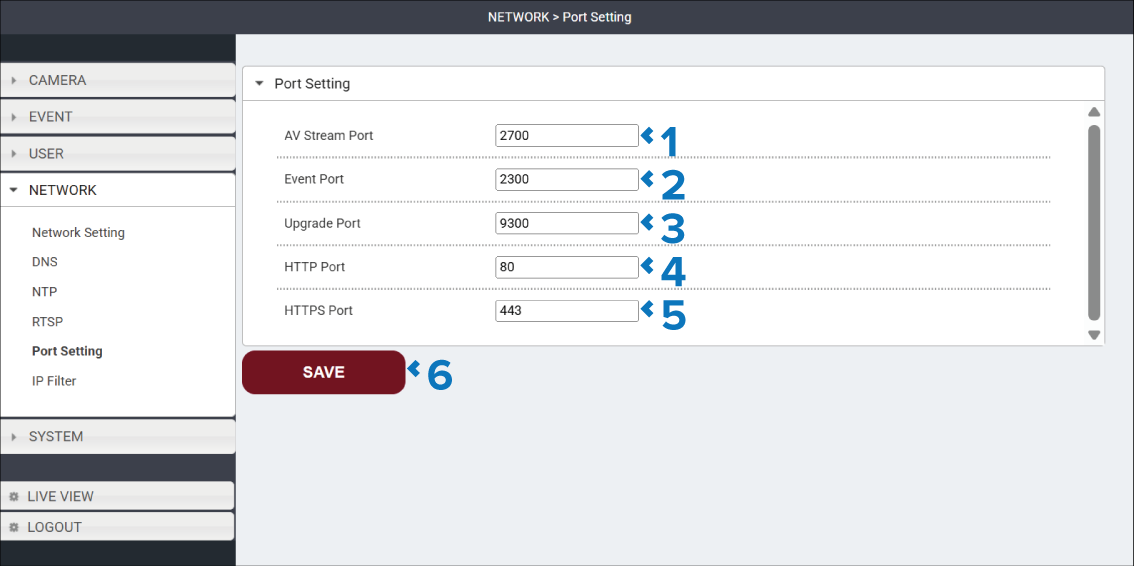
Description |
|
|---|---|
1 |
AV Stream Port field Specifies the network port used to transmit the camera’s audio and video stream to compatible client devices. |
2 |
Event Port field Specifies the network port used to transmit event notifications generated by the camera, such as motion detection events. |
3 |
Upgrade Port field Specifies the network port used when uploading firmware updates to the camera. |
4 |
HTTP Port field Specifies the port used for unsecured web browser access to the camera’s user interface. The default is port 80. Using the default port the camera’s user interface can be accessed from a web browser using its IP address (e.g.: http://198.18.4.249). If the port number is changed the port number will need to be added when accessing the user interface (e.g.: http://198.18.4.249:66). |
5 |
HTTPS Port field Specifies the port used for secured web browser access to the camera’s user interface. The default is port 80. Using the default port the camera’s user interface can be accessed from a web browser using its IP address (e.g.: https://198.18.4.249). If the port number is changed the port number will need to be added when accessing the user interface (e.g.: https://198.18.4.249:66). |
6 |
SAVE button Select the SAVE button to save any changes you have made before leaving the page. |