NTP
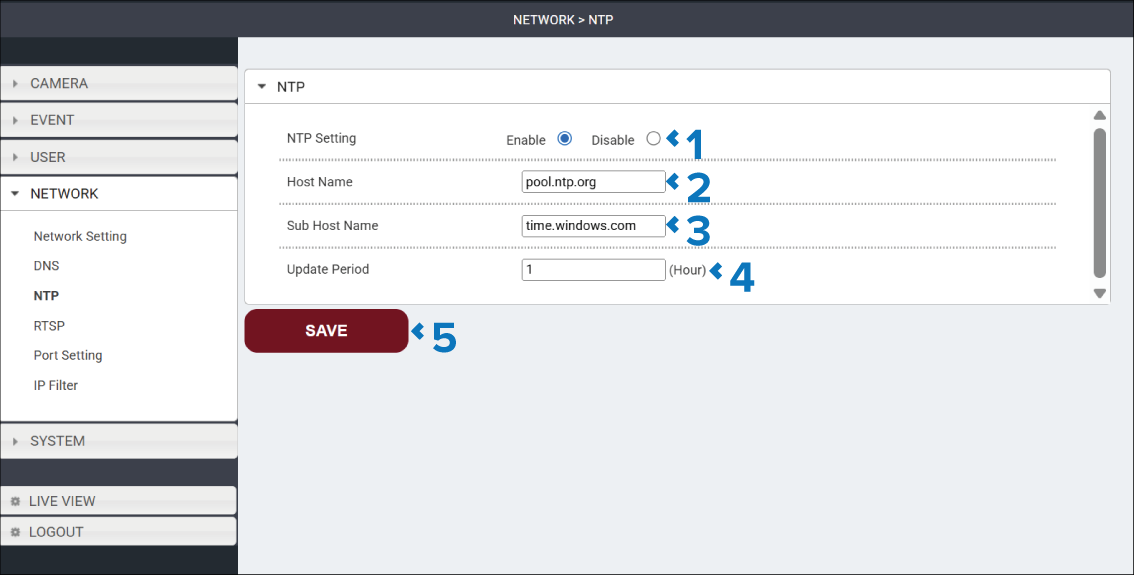
If enabled the NTP page is used to view and configure the Network Time Protocol (NTP) that the camera will use to automatically obtain date and time.
The NTP page is accessed by selecting: in the Navigation pane.
Description |
|
|---|---|
1 |
NTP Setting radio button Enable or Disable the use of an NTP server. |
2 |
Host Name Enter the address for the NTP server. For example: “pool.ntp.rog”. |
3 |
Sub Host Name Enter the sub host name for the NTP server. For example: “uk.pool.ntp.rog”. |
4 |
Update Period Specify the update period in hours. |
5 |
SAVE button Select the SAVE button to save any changes you have made before leaving the page. |