Motion Detection
The Motion Detection page is used to configure the camera’s motion detection alarm.
The Motion Detection page is accessed by selecting: in the Navigation pane.
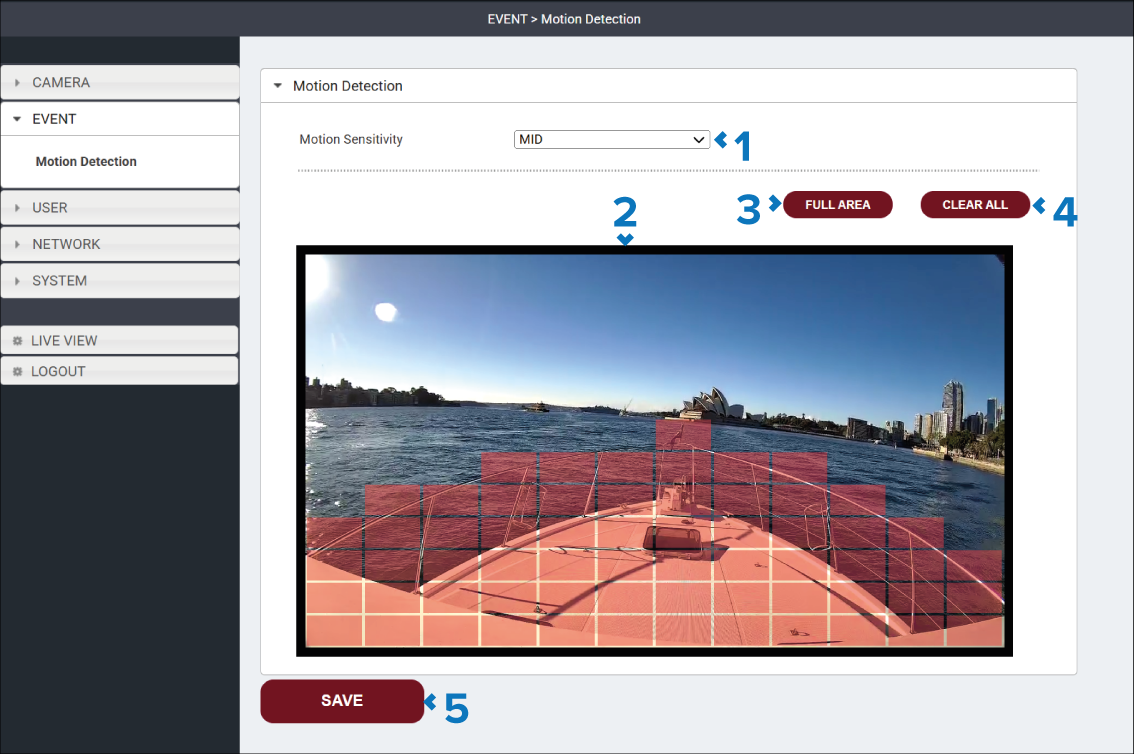
The Motion Detection feature uses a grid overlay to define the areas of the image that are monitored for motion. Red grid cells indicate active motion detection zones. Motion detected in these zones will cause an event to trigger.
Description |
|
|---|---|
1 |
Motion Sensitivity drop down The Motion Sensitivity settings specifies how sensitive the active zones are to motion. The higher the sensitivity settings the more sensitive active areas are to motion.
|
2 |
Live View pane The Live View pane shows the live video feed from the camera and provides the grid overview used to define the active motion areas. Red cells indicate active motion areas, clear areas indicate inactive motion areas. Selecting a cell or a clear area either adds or removes active cells. |
3 |
FULL AREA button Select the FULL AREA button to mark the whole image as active for motion detection. |
4 |
CLEAR ALL button Select the CLEAR ALL button to mark the whole image as inactive for motion detection. |
5 |
SAVE button Select the SAVE button to save any changes you have made before leaving the page. |