Shortcuts menu
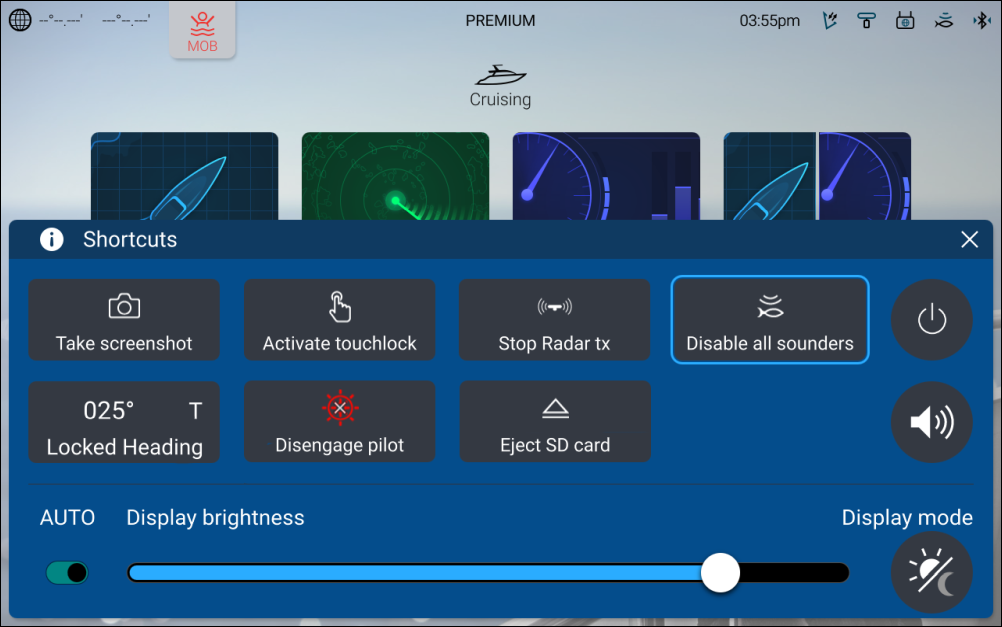
The Shortcuts menu can be accessed by swiping left to right across the Power swipe area on touchscreen displays or by pressing the physical Power button.
Shortcuts menu
Note
Some of the displayed options are dependent on connected hardware, e.g. the Engage pilot/Disengage pilot option is only available if you have a compatible autopilot system connected and integrated with your display.
The following shortcuts are available.
Take Screenshot
Take ScreenshotActivate Touchlock
Activate TouchlockStop Radar transmitting
Stop Radar transmittingRadarStop transmittingDisable all Sounders
Disable all SoundersSonarDisable all soundersAdjust Locked heading
Adjust Locked headingAutopilotAdjust locked headingEngage / Disengage autopilot
Engage / Disengage autopilotAutopilotEngage or DisengageEject SD card
Eject SD cardExternal storageEject SD cardPower off
Power offAdjust audio speaker volume
BluetoothVolumeAudio VolumeAdjust Brightness
BrightnessToggle auto brightness on and off (Axiom® 2 displays only).
Display modeDisplay mode