Audio volume control
When your display has audio speakers connected via Bluetooth, or via RCA connections on Axiom® 2 displays, volume controls will be available in the Homescreen status area. Additionally, on the Shortcuts menu, separate controls are available for the audio volume and alarms volume for Apps.
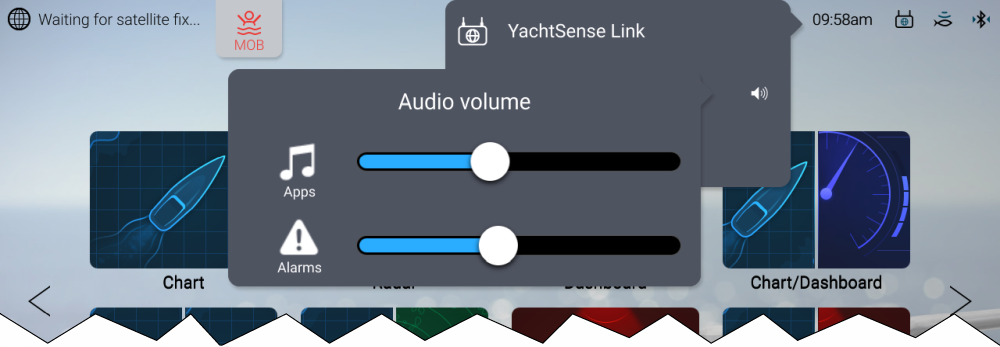
Figure 1. Homescreen status area
From the Homescreen, select the status area located on the top right of the screen, and then select the Speaker symbol to display the volume controls.
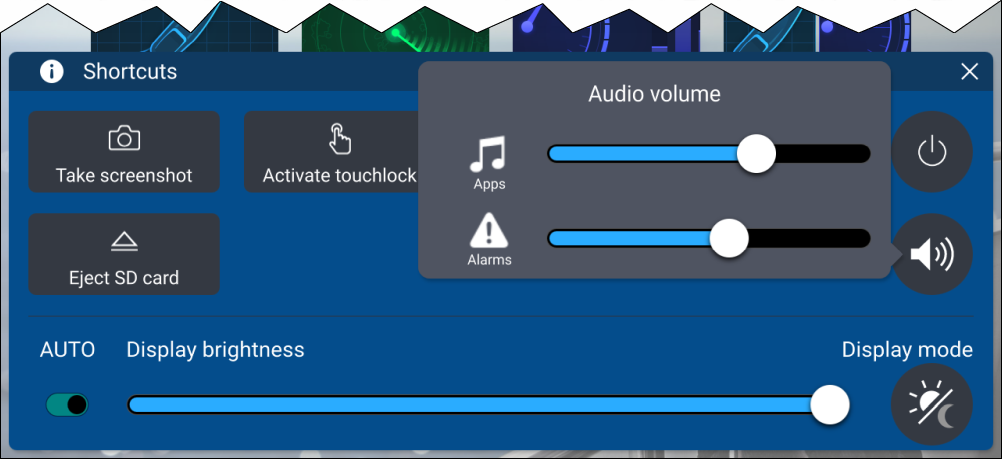
Figure 2. Shortcuts menu
From the Shortcuts menu, select the speaker symbol to display the volume controls.
AudioSpeaker volumeBluetoothSpeaker volumeUse your finger to move the volume control along the relevant slider bar to adjust the volume.
A Bluetooth speaker will take priority over RCA audio and HDMI out (i.e.: if all are connected, audio will only be output from the Bluetooth speaker; if only RCA and HDMI out are connected, the audio will play from both. In this scenario, to output from RCA audio / HDMI out instead, switch the Bluetooth speaker off).