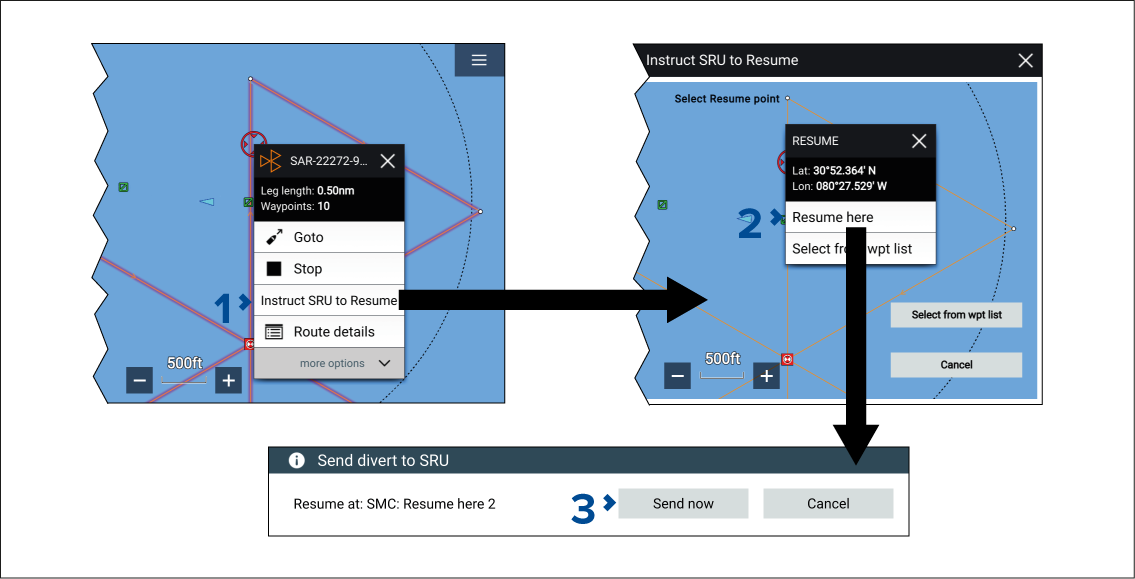
When an SMC has instructed an SRU to divert and the SRU
has initiated the divert, the SMC can also instruct the SRU of a specific
point where they should resume the search from.
Note
When a SAR pattern is broadcast it is duplicated.
To access the broadcasted SAR pattern’s context menu options, instead
of the options for the original SAR pattern, you may need to hide
the original SAR pattern. For details refer to: Hiding original SAR pattern
Note
An SMC can only specify a resume
point once the SRU has initiated the divert.
Select the SAR pattern onscreen to open the context menu
and then select Instruct SRU to Resume from the
pop-over options.
The Instruct SRU to Resume option can
also be selected from:
The SRU BlueForce target icon’s context menu.
The SMC searches list pop-over options (If the SMC searches
list is accessed from the Homescreen rather than from the Chart app
menu you can only select a waypoint from the waypoint list or enter
the lat/long coordinates for the divert point).
The message’s pop-over options from the messages inbox.
Choose a point along the search route or a waypoint ahead
of the divert location and then select Resume from here from the context menu.