SMC action — Instructing SRU to divert

An SMC can instruct an SRU to divert. The divert instruction provides the SRU with the location that they should divert to. Optionally the divert instructions can also include a point in the current search pattern that the SRU should perform the divert from. Once the SRU has initiated the divert the SMC can also instruct the SRU of the point in the search pattern that they should resume from once the divert is complete.

Important

SAR patterns created with the Round pattern option disabled will be automatically rounded if they are broadcast. This means that the SMC SAR pattern may be different from the SAR pattern received by the SRU. In this situation SMC instructed diverts may also appear in a different location. To prevent this occurrence, ensure that the Round pattern option is enabled on the SMC system before creating the SAR pattern.

Note

When a SAR pattern is broadcast it is duplicated. To access the broadcasted SAR pattern’s context menu options instead of the options for the original SAR pattern you may need to hide the original SAR pattern. For details refer to: Hiding original SAR pattern
Note

An SMC instructed divert can only be performed once the SRU has reached the CSP and has commenced the search.

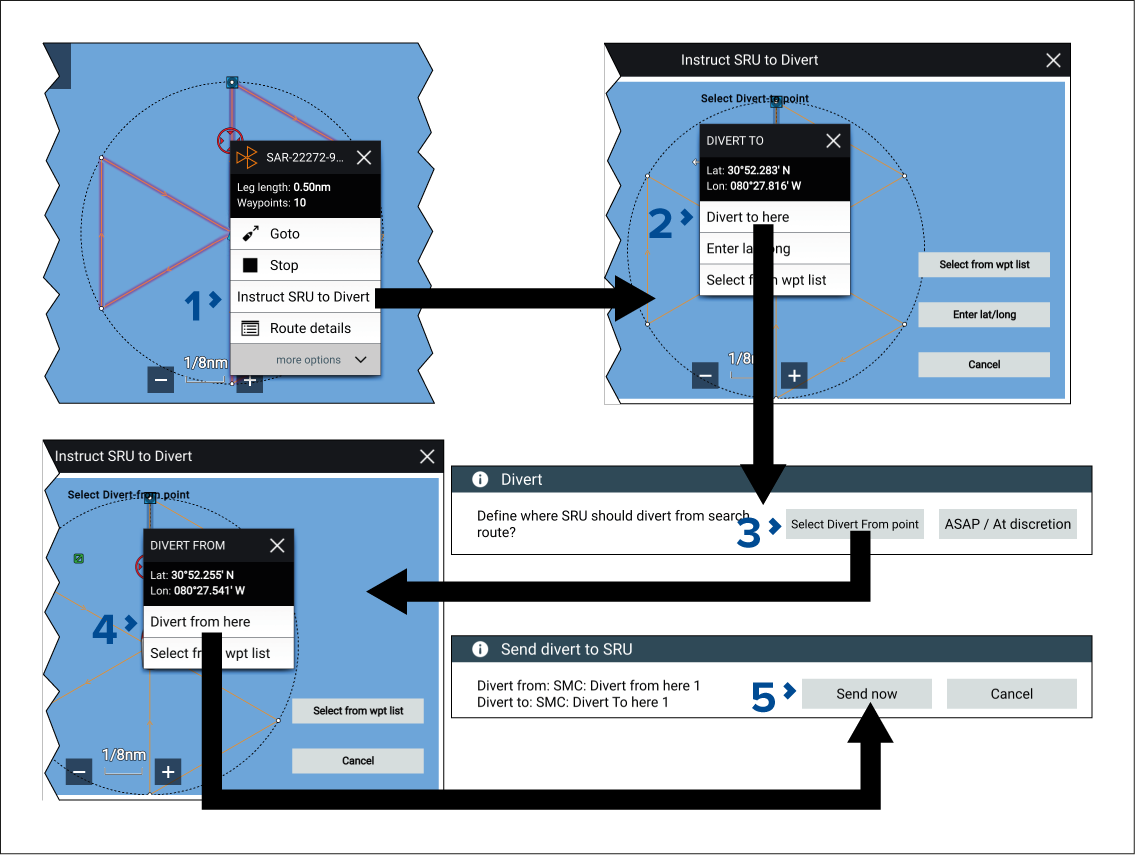
  1. Select the SAR pattern onscreen to open the context menu and then select Instruct SRU to Divert from the pop-over options.
    Instruct SRU to Divert can also be selected from:
    • The BlueForce target icon’s context menu.

    • The SMC searches list pop-over options (If the SMC searches list is accessed from the Homescreen rather then the Chart app menu you can only select a waypoint from the list or enter lat/long coordinates for the divert point).

    • The message’s pop-over options from the messages inbox.

  2. Select the divert location.

    The divert location can be set by:

    • selecting a location onscreen and then selecting Divert to here,

    • selecting Select from wpt list and using a waypoint that has already been created.

    • selecting Enter lat/long and entering the coordinates for the divert location.

  3. Choose where the SRU should divert from by selecting:
    • Select Divert From point — allows you to select a waypoint in the search pattern that the SRU should divert from when it is reached.

    • ASAP / At discretion — allows the SRU to decide when to perform the divert.

  4. If Select Divert From point has been selected choose the point along the search pattern’s route legs or a waypoint in the search pattern and then select Divert From here from the context menu.
  5. Select Send now.