Radar target list
The target list identifies: Target number, Range and Bearing from your vessel. Where relevant, CPA (Closest point of approach) and TCPA (Time to Closest Point of Approach) values will also be displayed.
RadarTarget list
The Radar target list can be accessed from the Targets menu in the Radar app and Chart app: .
The Radar target list can be sorted by either Number or Range by selecting the Sorted By option located at the bottom of the LiveView pane:
Number — List sorted by Target number so that the first detected target appears at the top of the list.
Range — List sorted by proximity to your vessel with the closest target appearing at the top of the list. The list will automatically update as targets become closer or farther away.
Selecting a target from the list highlights the selected target in the LiveView app pane on the right of the page and opens the Pop-over menu.
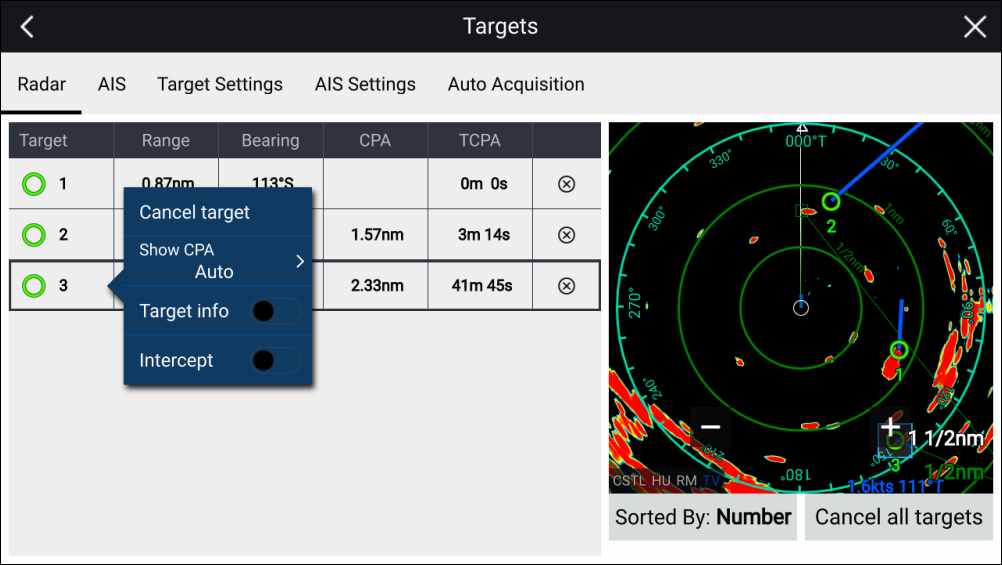
Radar targetCancel targetsRadar targets can be cancelled individually by selecting the ‘X’ next to the target’s details in the list, or you can cancel all targets by selecting Cancel all targets.