Race start page
The race start data page is available in the Dashboard app, when the MFD has been configured to use the Sailing boating activity during the initial MFD start up wizard. The race start page includes data relevant to race sailing and includes a graphical sailing dial.
Dashboard app Race start pageSailing dialRace start page Sailing dialThe apparent wind dial is the default dial displayed on the race start page.
When the Sail performance setting has been configured dynamic wind angle targets will be displayed. The sail performance setting can be configured from the Boat details menu: .
If the Sail performance setting has not been configured then close hauled angle indicators are displayed instead of wind angle targets.
The race start page can be used in combination with the Laylines feature and race start line feature available in the chart app to optimize your sailing performance. For details about the layline features refer to:
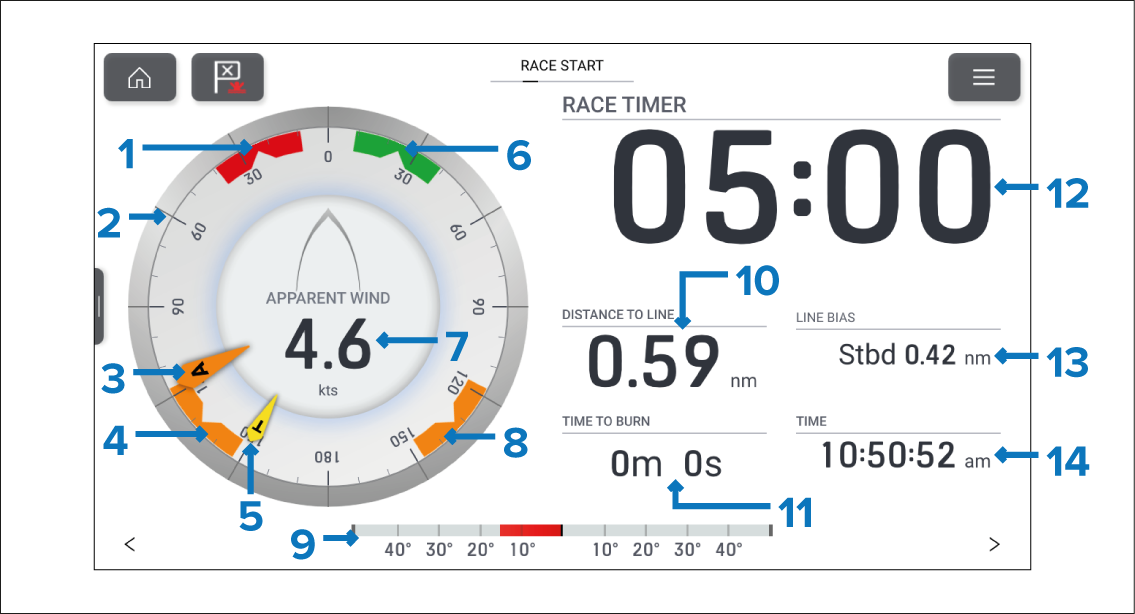
Figure 1. Example — Race start page with apparent wind sailing dial
Port wind angle target — Align the larger wind indicator (AWA or TWA) with the notch to optimize Velocity Made Good (VMG) when tacking to port upwind.
Compass dial — The compass dial remains fixed and the indicators move around the dial to indicator direction/angle.
AWA indicator — Apparent Wind Angle.
Downwind angle target — Align the larger wind indicator (AWA or TWA) with the notch to optimize Velocity Made Good (VMG) when gybing downwind
TWA indicator — True Wind Angle.
Starboard wind angle target — Align the larger wind indicator (AWA or TWA) with the notch to optimize Velocity Made Good (VMG) when tacking to starboard upwind.
Apparent wind speed
Downwind angle target — Align the larger wind indicator (AWA or TWA) with the notch to optimize Velocity Made Good (VMG) when gybing downwind
Rudder bar — Provides an indication of rudder position.
DISTANCE TO LINE — Distance to your race start line.
TIME TO BURN — The time to wait to cross the start line at maximum speed.
RACE TIMER — Select the race timer to configure and start/stop the race timer.
LINE BIAS — Helps to determine the optimum point to cross the start line.
TIME — Current time.
The apparent wind dial can be changed to one of the alternative sailing dials.
The sailing dials are unique to default pages and cannot be reproduced on custom data pages.
Data items 10, 11, 13 and 14 can be customized. Data item 9 can be hidden if desired.