Race start line (SmartStart) and Race timer
The Race start line and Race timer features can help you achieve a better racing start. The features assist you in approaching the race start line at the optimum speed, angle and time.
Sailing Race start lineTime to burnSmartStartRace timer
The basic concept of an effective race start is to guide your vessel and tune the sail configuration in an optimum way to ensure you are approaching the start line at the very last moment with full power. In race sailing, the countdown to this last moment is known as “Time to burn”.
The Race start line and Race timer features are available when ‘Sailing’ is selected as the Boating activity during the initial MFD start up wizard.
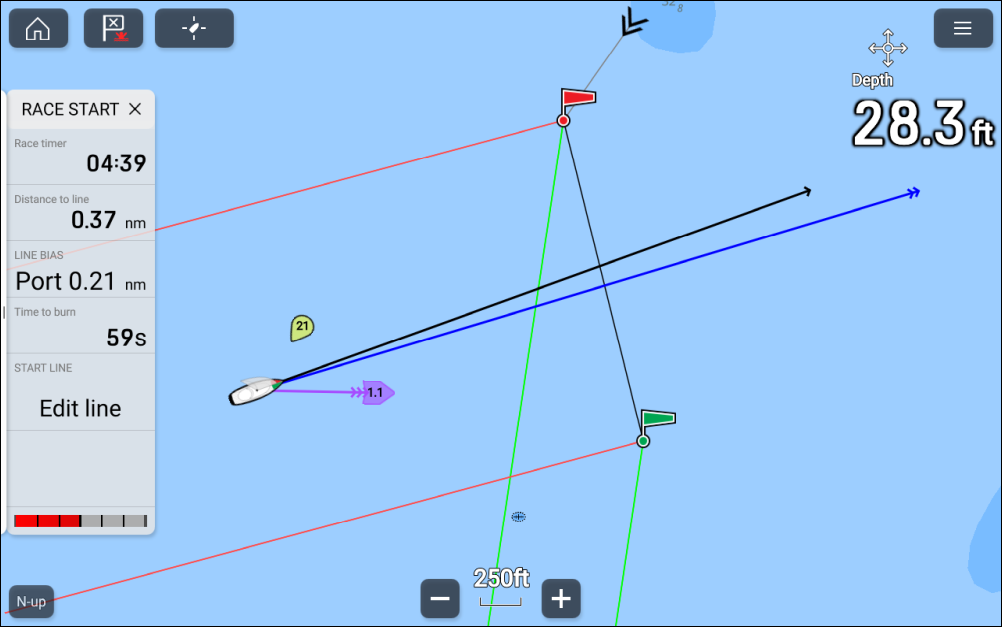
The Race start line feature provides a visual indication of the position of the start line on the chart, and provides key data, including Distance to start line, Line bias, and Time to burn data. These features can also be used in conjunction with Laylines to further assist you in optimizing your approach to the start line. When the Race start line, Race timer and Laylines are active, Laylines will visually protrude from the Race start line’s port and starboard ends to help guide your vessel on an optimum course to the start line.
LaylinesFor more information on Laylines, refer to: Laylines
With the Chart app set to Racing mode the Race start line can be created by adding port and starboard ends using the chart context menu. The Race start sidebar’s Edit line option and the main menu’s Race start line option can be used to create a start line by pinging your vessel’s location when it reaches each end of the start line.
The Race stat line visual graphics are displayed in Racing mode and Navigate mode in the Chart app.
The Race start line and Race timer data is displayed in the Race start sidebar and on the Dashboard app’s Race start data page. For more details on the Race start page refer to: Race start page
The Race start timer is used to count down to the start of the race, once the timer reaches zero it will count up indicating the time since the race began.
The Race start timer can be controlled from the chart app main menu, Race start sidebar and Race start data page. The Race timer can also be added to any Dashboard app data page.