Navigation page
The navigation data page is always available. The navigation page includes data relevant to navigation and includes a graphical navigation compass dial.
Dashboard app Navigation pageNavigation dialNavigation page Navigation dial
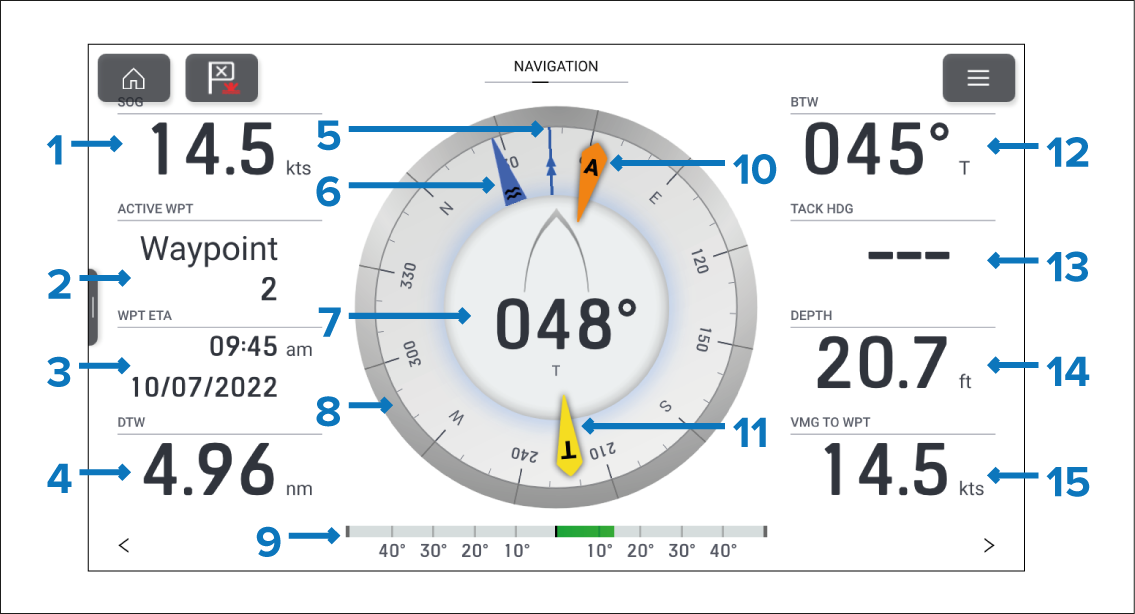
Figure 1. Default Navigation page
SOG — Speed Over Ground.
ACTIVE WPT — Active waypoint is the current destination (waypoint or goto location).
WPT ETA — Estimated time of arrival for the active waypoint location.
DTW — Distance to the active waypoint.
COG indicator — Course Over Ground.
Tide indicator — Tide direction.
Heading — Vessel heading.
Compass dial — The compass dial will rotate to provide indication of heading.
Rudder bar — Provides an indication of rudder position.
AWA indicator — Apparent Wind Angle.
TWA indicator — True Wind Angle.
BTW — Bearing to the active waypoint.
Tack hdg — Tack heading.
Depth — Water depth.
VMG to WPT — Velocity Made Good to Waypoint.
The navigation dial and its contents are unique to the navigation page and cannot be reproduced on other data pages. The navigation dial cannot be removed or hidden.
Data items 1 to 4 and 12 to 15 can be customized. Data item 9 can be hidden if desired.