Polar laylines
In sailing, the Velocity Made Good (VMG) principle demonstrates that travelling in a straight line is not always the quickest route, and polars enable you to optimize your vessel's performance to its best advantage, by improving the accuracy of LightHouse's dynamic laylines to display how far you need to sail on a current tack to reach a target waypoint after tacking and taking wind conditions into consideration.
Laylines Polar
Polars describe how fast a sailing vessel may travel at different wind speeds (TWS), and at different angles to the wind (TWA). Every type of sailing vessel has its own polar table (or VPP, Velocity Prediction Program), calculated from hull shape, weight, rigging, and sail setup. LightHouse has Polar data for over 500 popular sailing hulls preloaded. You can use the Polar options in the Laylines tab to select the boat model that best matches your own, in terms of Polar information.
For a list of preloaded polars, see: https://support.raymarine.com/s/article/List-of-Boat-Polars-in-Lighthouse-up-to-LH4-5-84?language=en_US
You can also create your own table of polar data for your specific vessel, by downloading a template from the Raymarine website and populating the template with the key polar data for your vessel. This data is often provided by the boat manufacturer - refer to the manufacturer for more information.
You can download the Polar Table template here: https://www.raymarine.com/en-gb/learning/online-guides/polar-performance-data
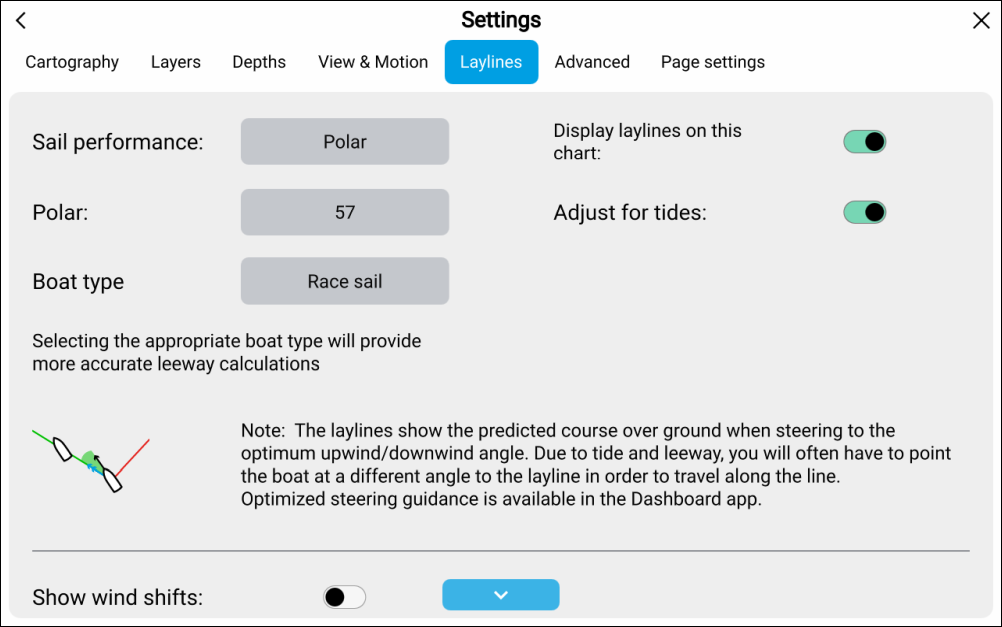
The following options are available for polar laylines:
Sail performance — Use this option to switch to using specified angles Fixed angles or Mirrored TWA.
Polar — Browse the list to find the boat model that most closely matches your own boat, or import your own polar table.
Sail performanceBoat typeBoat type — Determines the boat icon used in the Chart app. Selecting one of the following boat types will also provide more accurate leeway calculations:
Sail cruiser (leeway 5° – 10°)
Race sail (leeway (3° – 5°)
Catamaran (leeway 10° – 20°)
NoteLeeway calculations are only used when Adjust for tides is disabled.
If you select a boat type other than one with stated leeway angles then no leeway correction will be applied in the calculations.
Display laylines on this chart — Enables and disables display of laylines in the current Chart app instance.
Adjust for tides — When enabled layline calculations will take into account tidal flow and leeway.