DSC distress notification
The MFD can display DSC distress alert information received by a connected DSC VHF radio.
DSC Distress call NotificationsWhen DSC alarms are enabled (), a notification is displayed on the MFD when a DSC distress call is received by your DSC VHF radio.
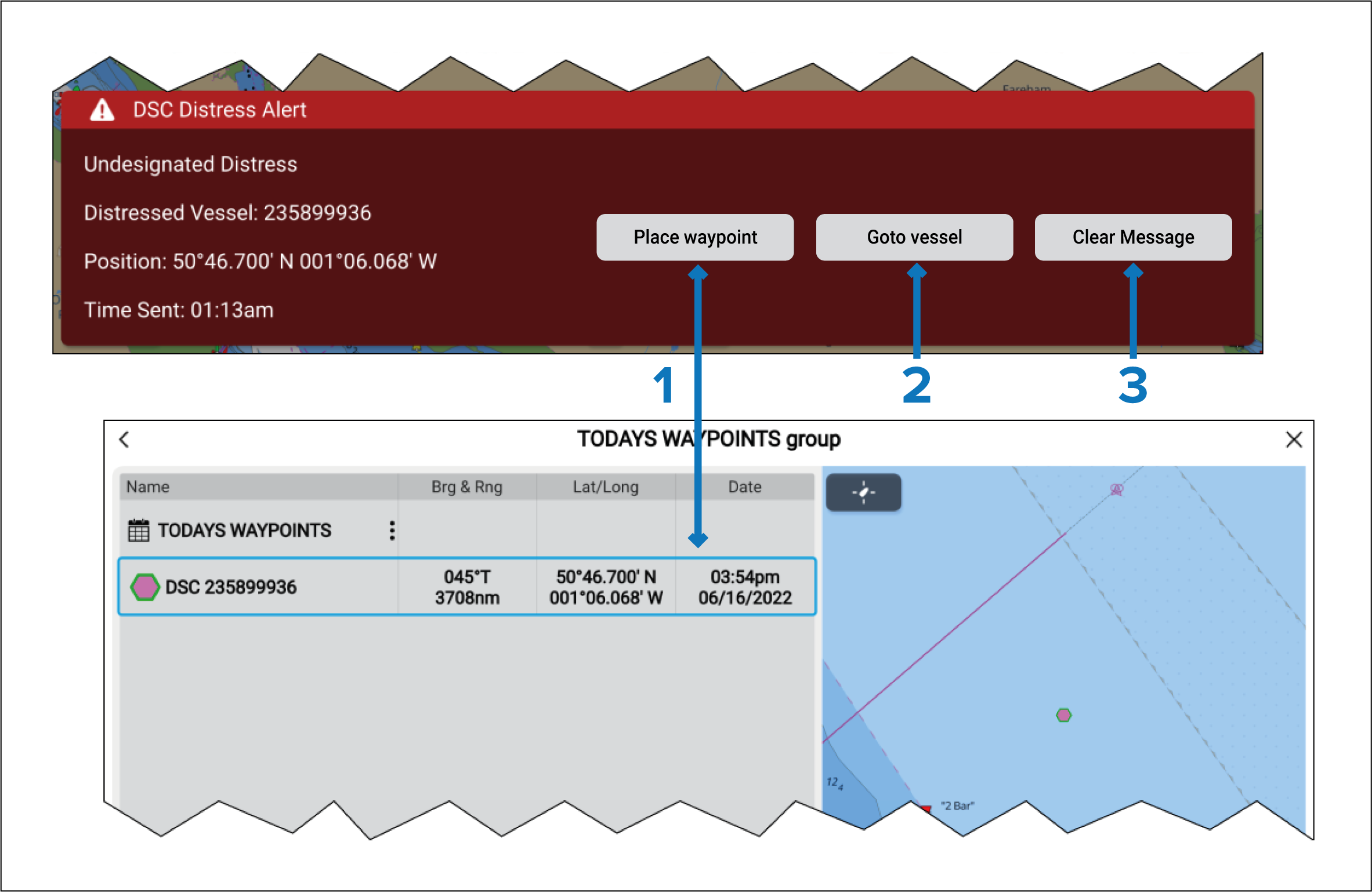
WaypointDSCPlace waypoint — Selecting Place waypoint places a waypoint at the latitude and longitude specified in the notification. The special DSC waypoint symbol is used for waypoints created from DSC notifications.
DSC waypoints use the MMSI of the originating vessel as the waypoint name. If subsequent DSC distress calls are received from the same vessel MMSI then, after selecting Place waypoint, there will be 2 options to choose from:
Replace waypoint — Selecting this option replaces the existing waypoint with a new waypoint using the updated notification details.
Place new waypoint — Selecting this option creates a new waypoint and adds a suffix (A.B.C etc.) to each new waypoint’s name.
Goto waypoint — Selecting this option sets a Goto to the latitude and longitude specified in the notification.
Clear message — Selecting this option clears the alert from the screen.
If position data is not included in the DSC notification, Place waypoint and Goto waypoint options will not be available.