Connections overview
The RNS-8 network switch includes the following connections:
ConnectionsOverview
The network switch is supplied with protective caps fitted to the network connection ports.
The protective caps should remain in place until connections are made. If a connection is not required then the protective cap should not be removed.
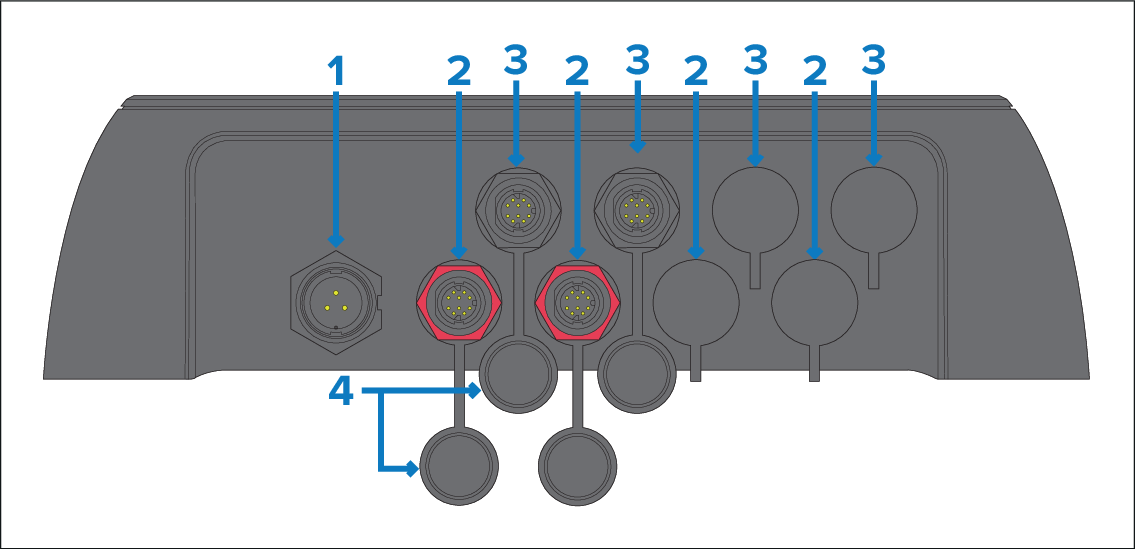
3-pin power connection port.
4x PoE (Classes 0 to 4), (30 W maximum per port) RayNet network connection ports (10 / 100 / 1000 Mbits/s). PoE ports 1, 3, 5 and 7 (from left to right) can be easily identified via their red locking nuts.
Non-PoE RayNet network connection port (10 / 100 / 1000 Mbits/s). Non-PoE ports 2, 4, 6 and 8 (from left to right) can be easily identified via their black locking nuts.
Protective cap.
You can mix a combination of PoE and non-PoE devices simultaneously, for a total of 8 devices (maximum PoE devices = 4; maximum non-PoE devices = 8).
For further network or power connection information, refer to the following sections:
When attempting to view your network switch’s port diagnostic information, it is vital to know the associated port number for each port.
For further port identification information, refer to the following section: RNS-8 Port identification