Analog video (Video 2) connection
Analog video feeds from sources such as a Thermal camera or Security camera can be connected to your display by connecting the device to the BNC connector included on the display’s Power / Video / Audio cable. The video feed can be viewed using the Video app.
ConnectionsAnalog videoAnalog cameraVideo 2Video connection
VIDEO 2 is the primary video connection.
The Video feed connected to VIDEO 2 is encoded as RTSP and streamed over Ethernet to networked displays.
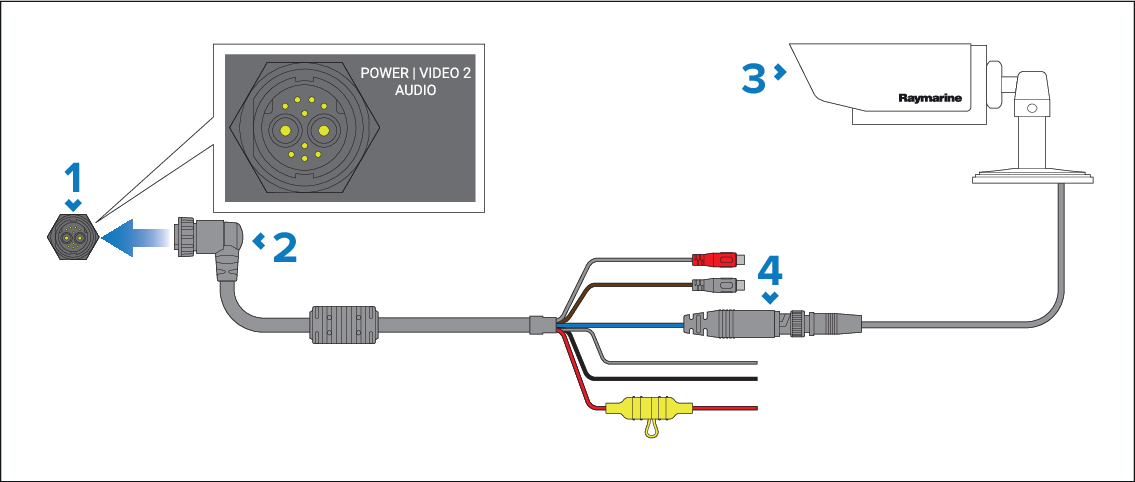
Display’s POWER | VIDEO 2 | AUDIO connector.
Power / Video / Audio cable supplied with your display.
Analog video device.
VIDEO 2 — Analog video BNC connector.
Axiom 2 XL displays are supplied with a Power / Video / Audio cable that has a right-angled connector. A straight connector cable is also available (A80744).
The original Axiom XL Power / Video / NMEA 0183 cables cannot be used with Axiom 2 XL displays.
For installation details, refer to the documentation provided with your analog video device.