The following steps will provide instructions on how to
surface mount the Axiom+ 7 using
the pre-fitted trunnion adaptor (supplied with all Axiom+ 7 display
variants).
InstallationSurface mountingTrunnion adapterMountingSurface mountingTrunnion adapterSurface mountingTrunnion adapter
Important
The supplied gasket provides a seal between the display and
a suitably flat and rigid mounting surface or binnacle. The gasket
should be used in all installations. It may also be necessary
to use a marine-grade sealant if the mounting surface or binnacle
is not entirely flat and/or has a rough surface finish.
In above decks installations, marine-grade sealant should always
be used to seal the gap between the edge of the mounting surface and
the edge of the display.
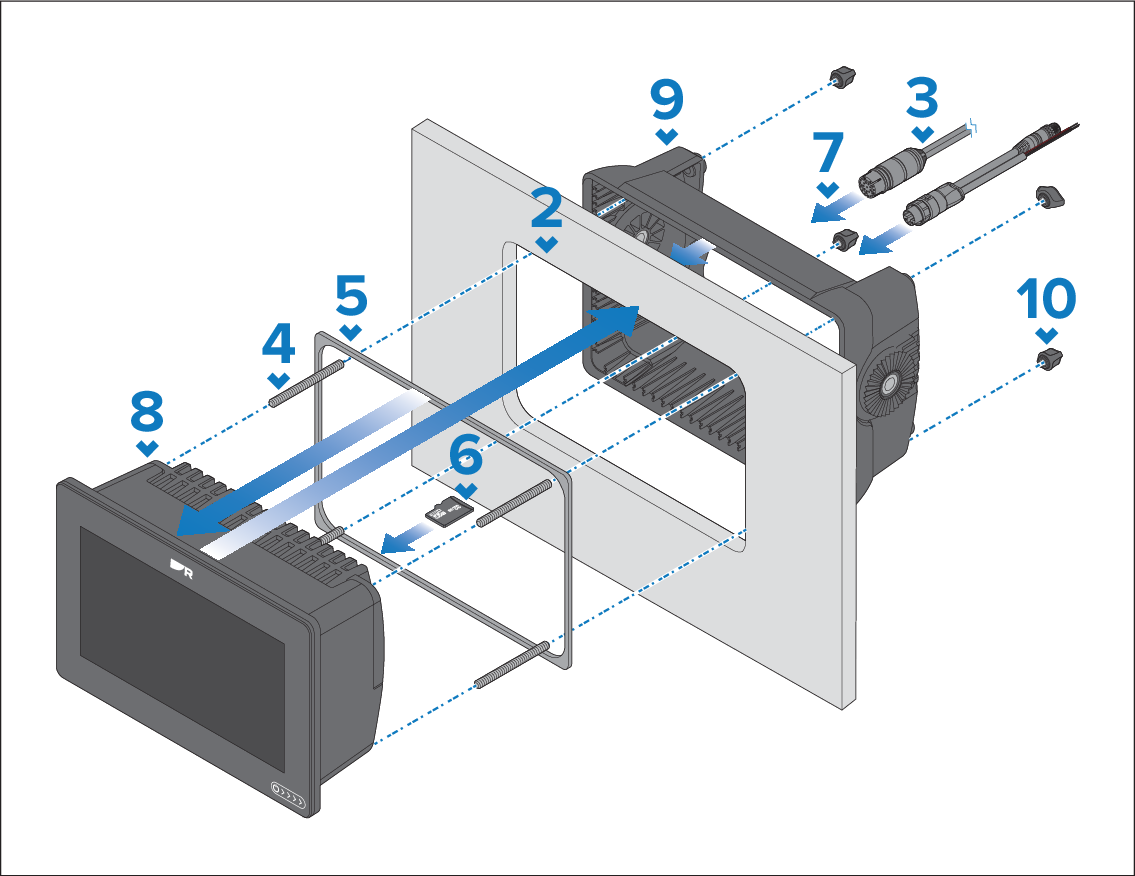
- Ensure that the pre-fitted trunnion adaptor has been removed
from the rear of the display in accordance with the instructions found
under the following section:
- Ensure that the mounting surface has been prepared for
surface mounting in accordance with the instructions found under the
following section:
- Route the relevant cables to behind the mounting surface
cut out.
This may be difficult or not possible once the display has
been mounted.
- Screw the 4 x supplied M5x58 threaded studs into the rear
of the display.
- Remove the backing from the supplied gasket and place the
sticky side of the gasket onto the flange on the rear of the display.
Press firmly onto the flange.
- If required, insert your MicroSD card into the card reader
which is located behind the rubber bung on the rear of the display.
- Connect the relevant cables to the rear of the display.
- Slide the display into the cutout area.
- Place the trunnion adaptor over the rear of the display.
- Secure the display in position by placing the 4x supplied
M5 thumb nuts onto the threaded studs and then hand-tightening until
secure.
Important To prevent potential damage to the
unit, do NOT overtighten the thumb nuts. Hand tighten only.