If your Radar scanner supports a Wi-Fi connection,
you can connect to a LightHouse™ MFD which also supports Wi-Fi. During pairing, the Wi-Fi credentials
of all MFDs with Wi-Fi switched on are sent to the Quantum Radar.
At subsequent power cycles the Quantum Radar will automatically connect
to the MFD with the strongest signal.
ConnectionsWi-Fi
Note
During initial set up you will have 60 minutes (for Quantum
Doppler software versions 2.43 or later) or 10 minutes (for earlier
Quantum Doppler software versions) in which to connect the Radar to
your MFD. After this time, if no connection is made, the Radar will
automatically go to Sleep. If this occurs, power cycle the Radar to
bring it out of Sleep mode and establish a connection.
Networked MFDs that only have their Wi-Fi enabled after the
initial pairing period, will send Wi-Fi credentials to the Radar when
their Wi-Fi is switched on.
Apply power to your MFD(s).
Power on and then enable the Wi-Fi connection to the MFDs
which have the strongest signal (typically these will be the MFDs
closest to and / or with the clearest line of sight to the Radar),
as identified during the pre-installation site survey
Apply power to your Radar scanner.
Select Quantum Radar from the settings
menu on the MFD:
On a LightHouse™ 4 / LightHouse™ 3 MFD: Homescreen > Settings > This display (tab) > Pair with Quantum.
If prompted, select OK to enable your
MFD’s Wi-Fi connection.
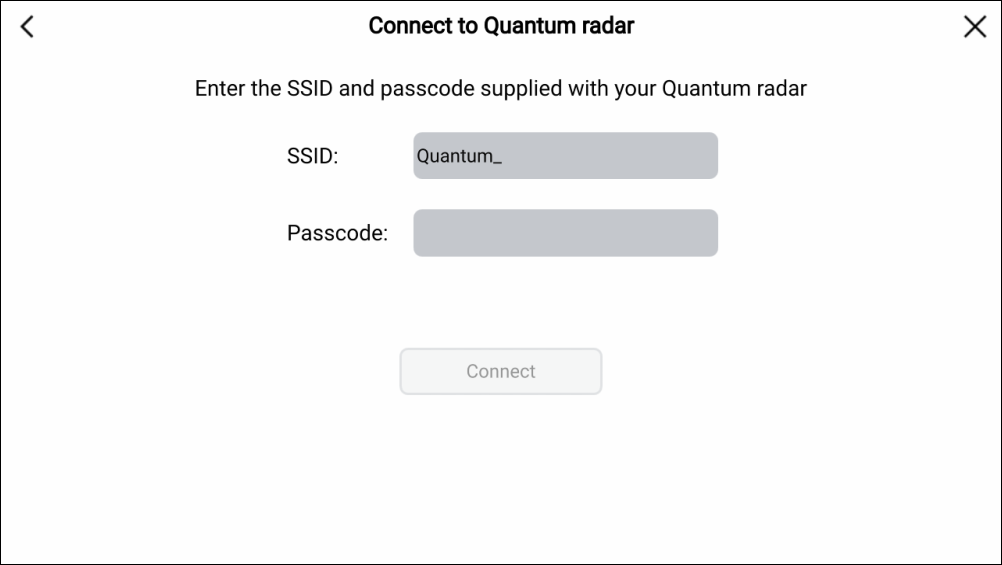
Enter the passcode (e.g. 901589f5) in
the Passcode field.
for details on locating your SSID and Passcode, refer
to the following section: Retain your Wi-Fi Passcode
Figure 1. LightHouse™ 4 connection
screen:
Important
Ensure that the SSID and Passcode are entered exactly as shown
on the serial number label that was supplied with the Radar.
The SSID is always made up of the word “Quantum”, followed
by an underscore “_”, followed by the product’s 7 digit serial number, (e.g. Quantum_1234567).
Select Connect.
The initial connection can take up to 2 minutes to complete.
If the connection does not complete within 2 minutes, power cycle
the Radar and repeat Steps 4 to 7.
Select OK from the Successful Connection
pop-up.
Open a Radar application page.
Check that the reported Radar on the power / transmit pop-up
is the Radar that you have just paired with.
If the correct Radar is reported, select Tx (Transmit).
If the reported Radar is not the Radar scanner you just
paired with, select the correct Radar from the Radar application menu: Menu > Select Radar: and then select Tx (Transmit).
The Radar image can be displayed on all networked MFDs.