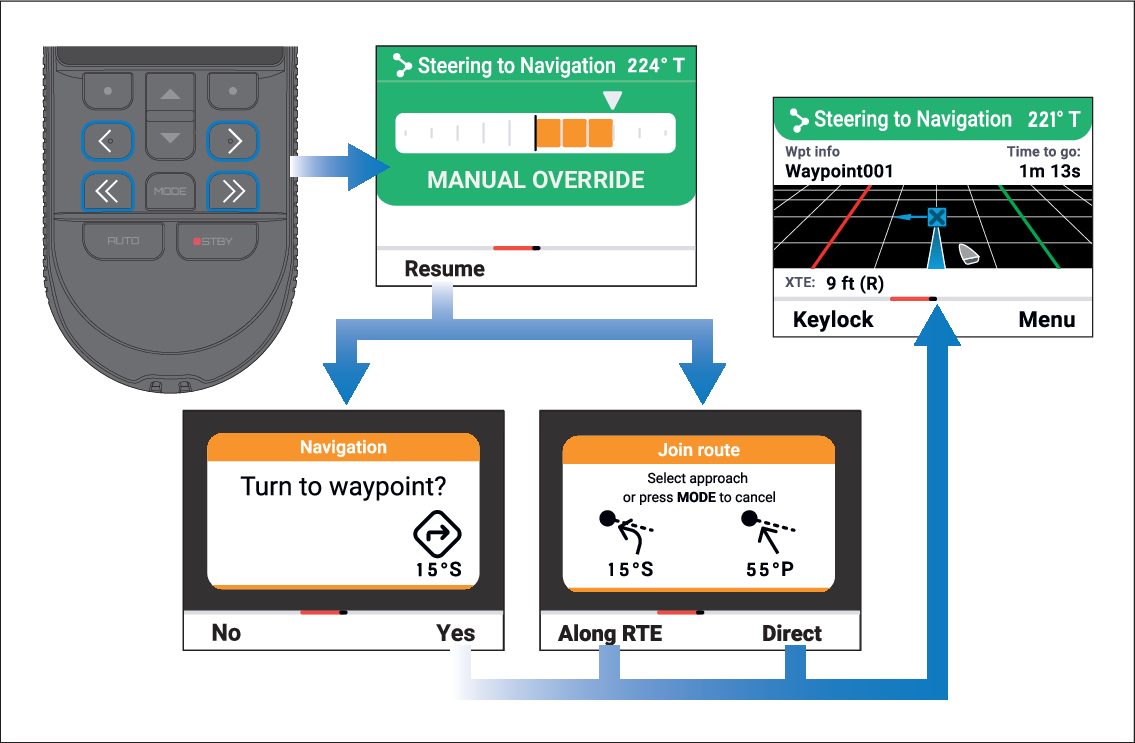
Steer to Navigation mode can be temporarily
overridden so that an obstacle can be avoided without disengaging
the autopilot.
Steer to NavigationOverrideIf an obstacle is in your path follow the steps below
to override navigation:
- Use the adjustment buttons to override navigation and change
your heading to avoid the obstacle:
< (Left 1°) — Each press will change
the autopilot’s course by 1° to the left.
<< (Left 10°) — Each press will
change the autopilot’s course by 10° to the left.
> (Right 1°) — Each press will change
the autopilot’s course by 1° to the right.
>> (Right 10°) — Each press will
change the autopilot’s course by 10° to the right.
- Press the Resume (Left soft) button
once you are clear of the obstacle.
If applicable, the Turn to waypoint, or Join route notification will be displayed.
- If the Turn to waypoint notification
is displayed, select the Yes (Right soft) button
to engage the autopilot, or
- If the Join route notification is displayed:
Select the Along RTE (Left soft) button
to engage the autopilot and steer your vessel back to its original
track, or
Select the Direct (Right soft) button
to engage the autopilot, restarting the track from your current position.
Steer to Navigation will recommence.