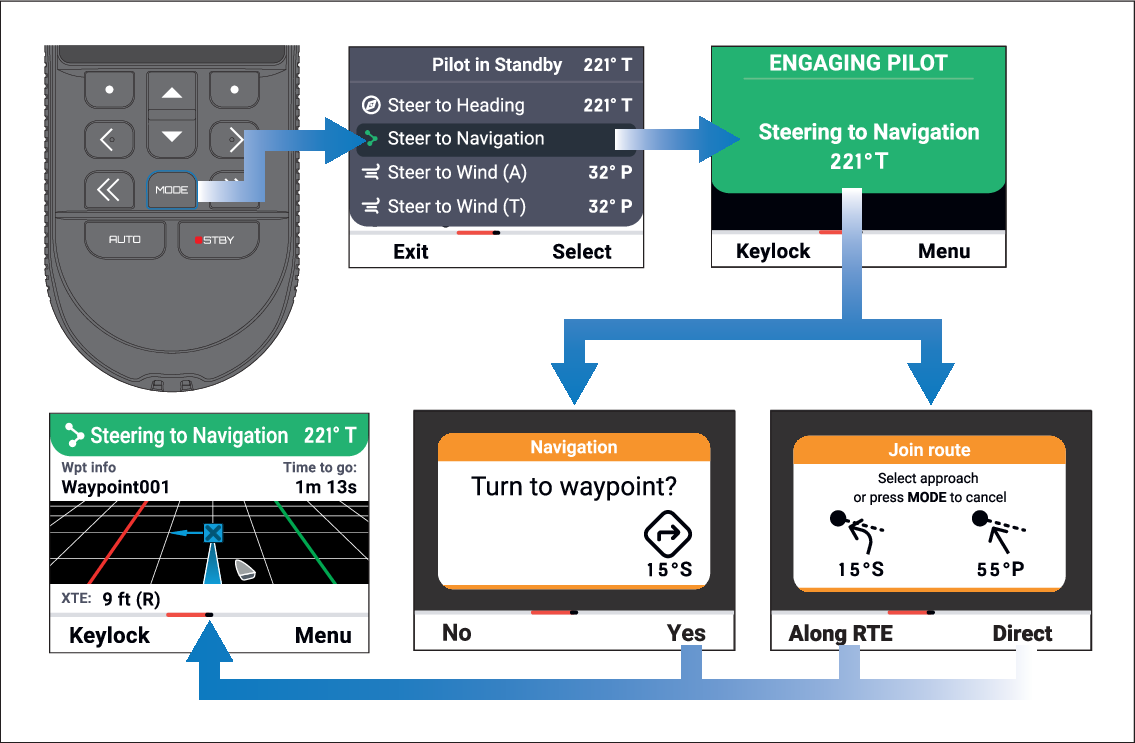
When there is active navigation on a connected chartplotter
the remote can engage the autopilot in Steer to Navigation mode.
AutopilotEngagingSteer to Navigation
To engage your autopilot in Steer to Navigation mode:
For Wheel and Tiller pilots, engage the mechanical drive
by either engaging the wheel drive’s clutch or attaching the pushrod
onto the tiller pin.
Initiate a Goto or Follow route on your chartplotter. For more information, refer to the LightHouse 4 Advanced Operation
Instructions (81406).
Important
It is the captain’s responsibility
to ensure a route is safe to navigate before commencing the follow.
Press the MODE button.
Select Steer to Navigation.
If navigation is to a single waypoint, or your current cross
track error is less than 30 m from the first waypoint in a route the Turn to waypoint notification is displayed.
If your current cross track error is greater than 30 m from
the first waypoint in a route the Join route notification
is displayed.
If the Turn to waypoint notification
is displayed, select the Yes (Right soft) button
to engage the autopilot, or
If the Join route notification is displayed:
Select the Along RTE (Left soft) button
to engage the autopilot and steer your vessel back to its original
track, or
Select the Direct (Right soft) button
to engage the autopilot, restarting the track from your current position.
When Steer to Navigation is engaged
the Navigation page will be displayed. For details
refer to: Navigation page