Skyhook mode
When the chartplotter is integrated with compatible Mercury® marine engines, Skyhook mode can be controlled from your chartplotter. Skyhook is a virtual digital anchor that uses GNSS data to maintain a boat’s Heading, Position, or both by compensating for the effects of wind and tide.
Mercury SkyhookSkyhook sidebarThe following Skyhook controls are available from the sidebar:
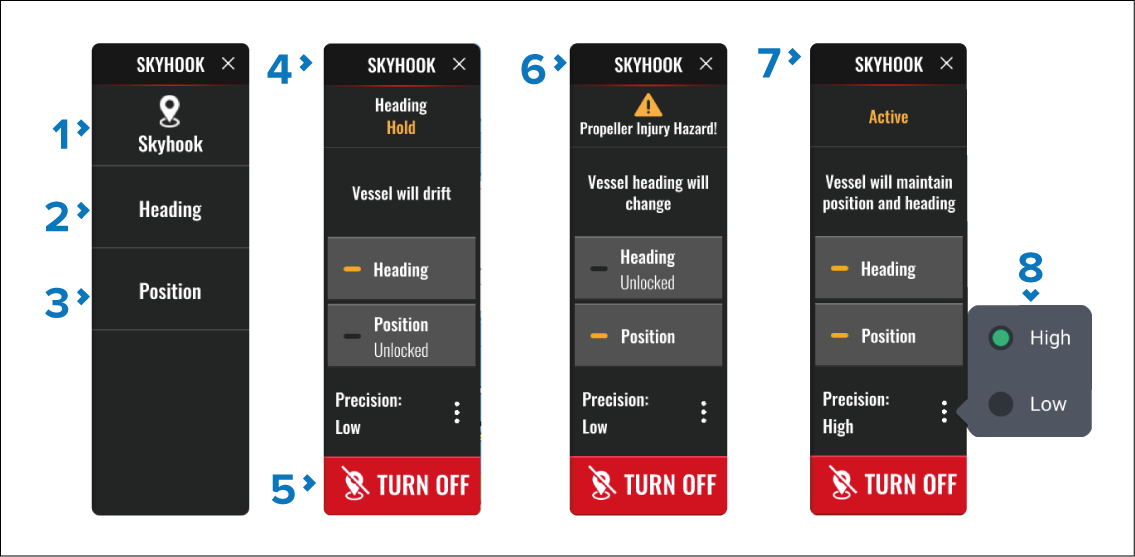
SkyHook — Engages Skyhook in heading and position hold mode. In Skyhook mode the boat’s heading and position will be maintained.
Heading — Engages Skyhook in heading hold mode. In heading hold mode the boat may drift but heading will be maintained.
Position — Engages Skyhook is position hold mode. In Position hold mode the boat’s heading may change but position will be maintained.
Heading hold mode — In heading hold mode selecting the Heading button will switch to position hold mode, pressing the Position button will switch to Skyhook mode.
TURN OFF — In any mode you can press TURN OFF to disable the mode.
Position hold mode — In position hold mode selecting the Position button will switch to heading hold mode, pressing the Heading button will switch to Skyhook mode.
Skyhook mode — In Skyhook mode selecting the Heading button will switch to position hold mode, pressing the Position button will switch to heading hold mode.
Precision — The Precision setting is included in all modes. The Precision setting determines how precisely the system will maintain heading, position, or both.
When Skyhook is selected, a warning is triggered alerting the operator to ensure that there are no swimmers in the vicinity of the vessel.
Before Skyhook is engaged you must inform passengers how the feature works, and that they must stay out of the water.
After Skyhook is engaged you must remain at the helm and maintain a vigilant watch, so that Skyhook can be quickly deactivated if someone goes in the water.