Fluid tanks
Detected compatible fluid tanks can be configured and calibrated.
Fluid tanks require a compatible tank sender or tank sender adaptor.
Fluid tanksThe following types of fluid tanks are available:
Fluid tanksFuel tanksFuel tanks (Propulsive fuel)
Fluid tanksFuel (gasoline) tanksFuel (gasoline) tanks (Non propulsive fuel)
Fluid tanksFresh water tanksFresh water tanks
Fluid tanksLive well tanksLive well tanks
Fluid tanksGray water tanksGray water tanks
Fluid tanksBlack water tanksBlack water tanks
The quantity of each type of detected fluid tank is shown in the Data sources menu: . Selecting the Configure button opens the Tank settings menu.
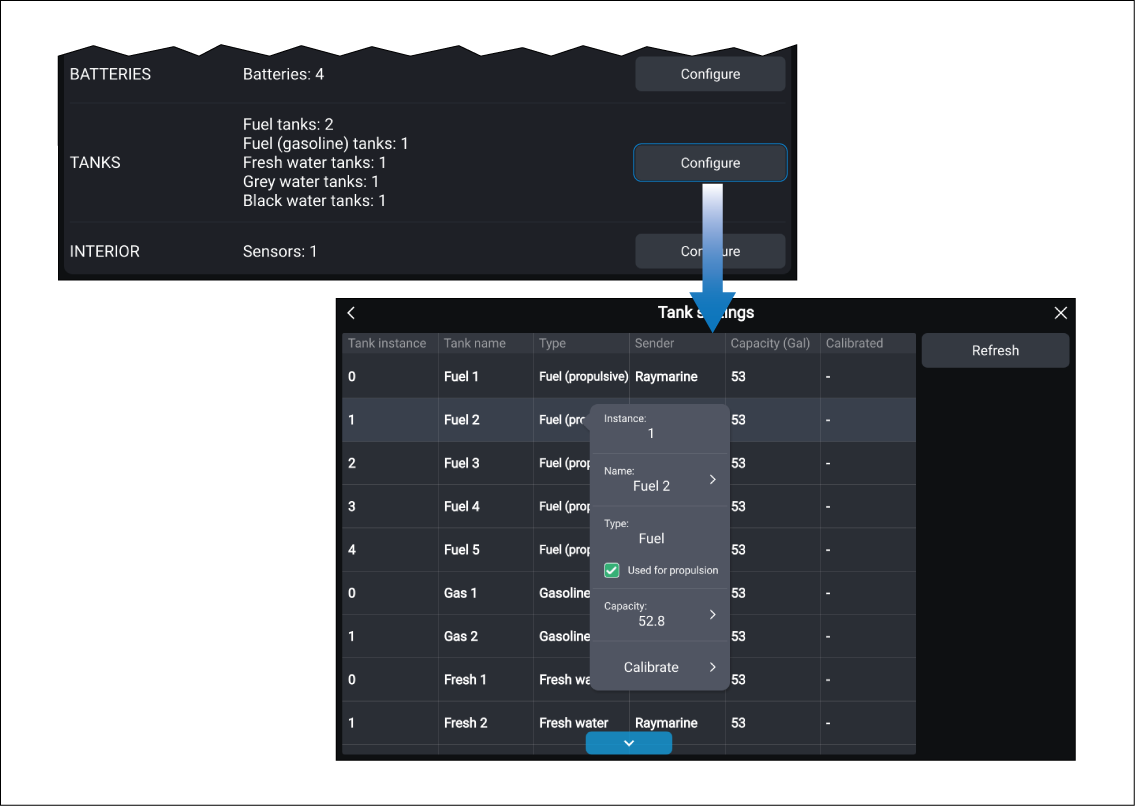
Selecting a fluid tank from the table opens a pop-over menu. The pop-over menu provides configuration options and the Calibrate option.
If the quantity of fluid tanks shown in the Data sources menu does not match the quantity in the table then either:
the fluid tank may not have a compatible sender, or sender adaptor, or
there is a problem with the data connection, or with the tank sender, or sender adaptor.