Windlasses settings
Windlass anchor chain counters can be viewed and customized from the Configure Windlass menu.
The chartplotter automatically detects windlasses on the network when windlass information is transmitted using the standard NMEA 2000 PGN 128777.
Anchor chain counter WindlassPre-requisites:
Your chartplotter must be running LightHouse v4.8.164, or later.
Windlasses must be connected to a compatible interface / gateway that is connected to the same SeaTalk NG / NMEA 2000 network as the chartplotter.
Compatible interfaces:
At the date of publication of this document, the known working interfaces / gateways are:
Airmar SmartBoat ASM-C-T2.
LXNAV EMU (Engine Monitoring Unit), Version 2.38.
Interfaces / gateways from other manufacturers may work, but compatibility cannot be guaranteed.
Windlass ConfigurationThe Configure Windlass menu is accessed from the Data sources menu: .
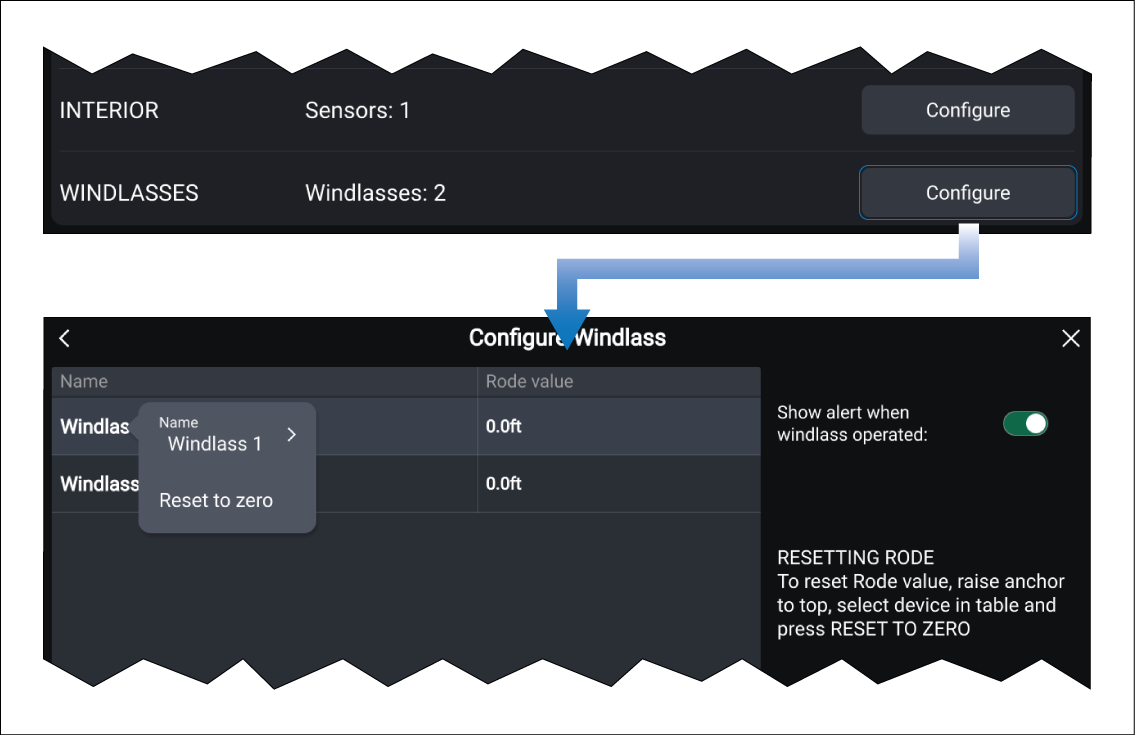
Figure 1. Windlasses configuration
The Configure Windlass menu lists all detected windlasses and provides the current Rode value for each. Default windlass names are based on the reported device name and instance (unique number).
Selecting a windlass from the table opens a pop-over menu. From the pop-over menu, you can rename the windlass, or select the Reset to zero option to reset the current rode value to zero.
Windlasses that are no longer detected, or have been removed can be deleted from the table by selecting the Remove option from the pop-over menu.
Enable the Show alert when windlass operated toggle switch to receive a notification each time windlass operation is detected. This notification will also include the current Rode value.
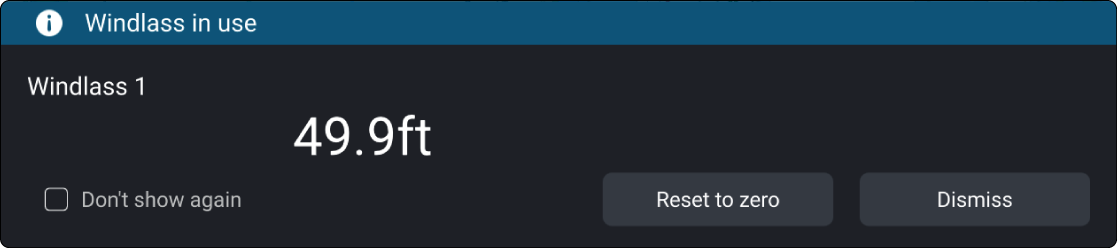
Figure 2. Windlass notification example
The notification provides the current Rode value and the following options:
Don’t show again — Select to disable future windlass notifications.
Dismiss — Select to acknowledge and dismiss the notification.
Reset to zero — Select to reset the Rode value to zero.
The Rode value for each windlass is also available as data items.