Diagnostics options
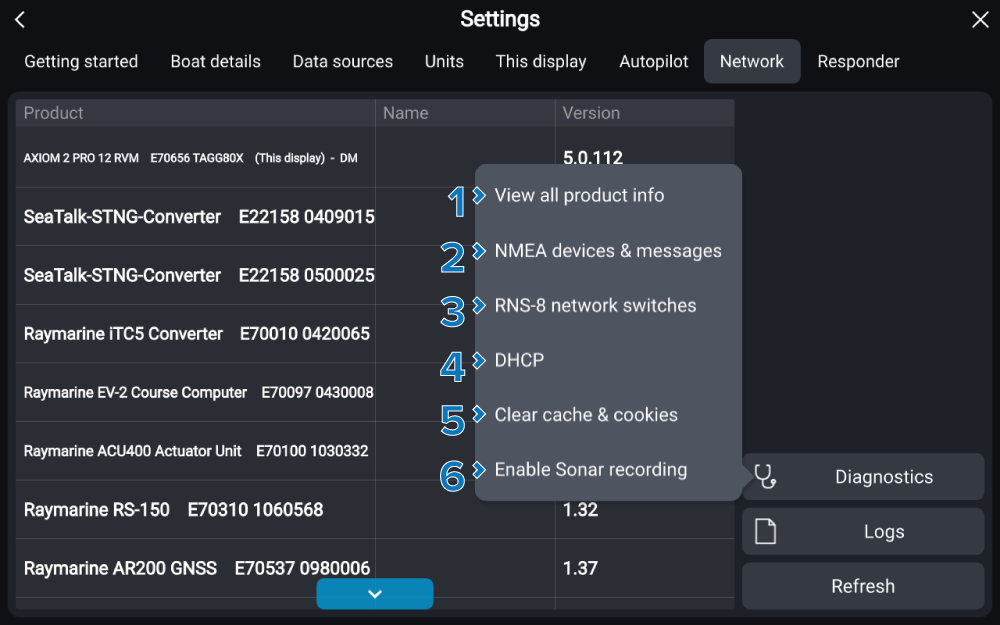
Diagnostics options are accessed by selecting the Diagnostics button on the Network settings menu.
The following diagnostics options are available:
Option |
|
|---|---|
1 |
ProductInformationView all product info View and save information about all products which appear in the network list. For more information refer to: Saving product information |
2 |
DiagnosticsNMEA 2000NMEA devices & messages View and record transmitted to and received NMEA 2000 data. For more information refer to: NMEA 2000 diagnostics |
3 |
DiagnosticsRNS–8RNS-8 network switches View diagnostics information for connected RNS-8 network switches. For more information refer to: RNS-8 Diagnostic information |
4 |
DHCPDHCP Determine the behavior of the chartplotter’s DHCP server. For more information refer to: Disabling DHCP |
5 |
TroubleshootingClear cacheClear cache & cookies Clear the cache and cookies from the chartplotter’s built-in browser. For more information refer to: Browser app and apk troubleshooting |
6 |
SonarRecordingEnable Sonar recording Record the fishfinder scrolling image as a video file, for troubleshooting purposes only. For more information refer to: Diagnostics sonar recording |