In through-surface cable routing installations the camera
cable must pass through the center of the mounting gasket.
MountingGasket installation
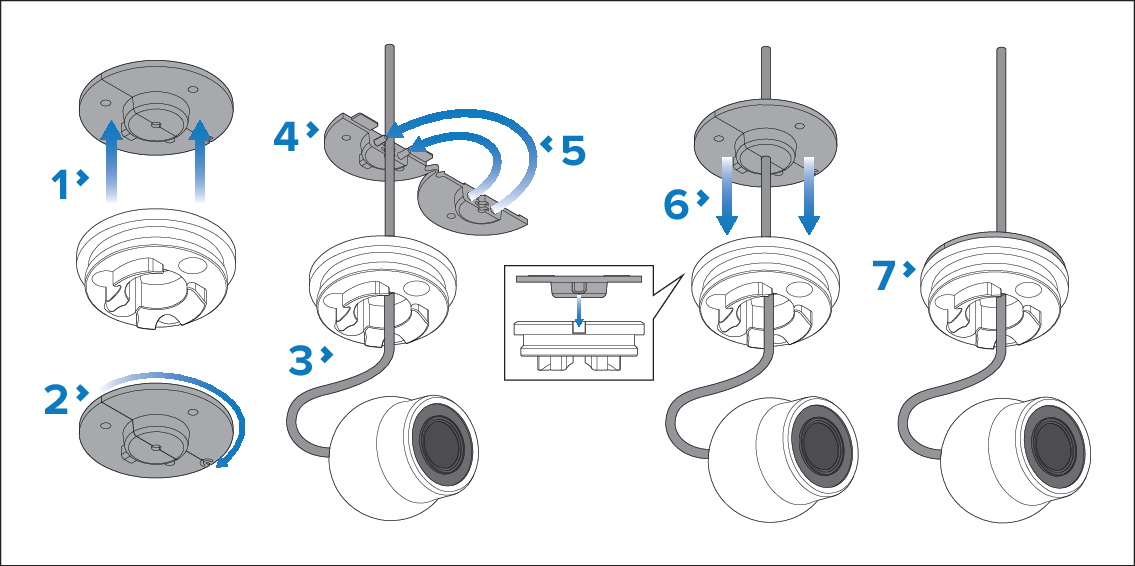
Remove the mounting gasket from the camera base.
Open the mounting gasket by gently pulling the two halves
apart on the side opposite to the gasket’s hinge.
Route the camera’s cable through the camera base.
Position the mounting gasket on the camera cable beneath
the camera base, ensuring that the cable is seated in the gasket’s
cable feed hole.
Close the mounting gasket, ensuring that the rubber locator
pins are fully seated in the corresponding holes and that the 2 alignment
tabs engage in the corresponding recesses.
Align the mounting gasket’s cable channel plug with the
corresponding cable exit channel in the camera base, then re-insert
the mounting gasket into the camera base by sliding it down the cable.
Ensure that the gasket halves do not separate while the gasket
is being moved down the cable and re-inserted into the camera base.
Ensure that the gasket is fully seated around the circumference
of the camera base.