Date / Time
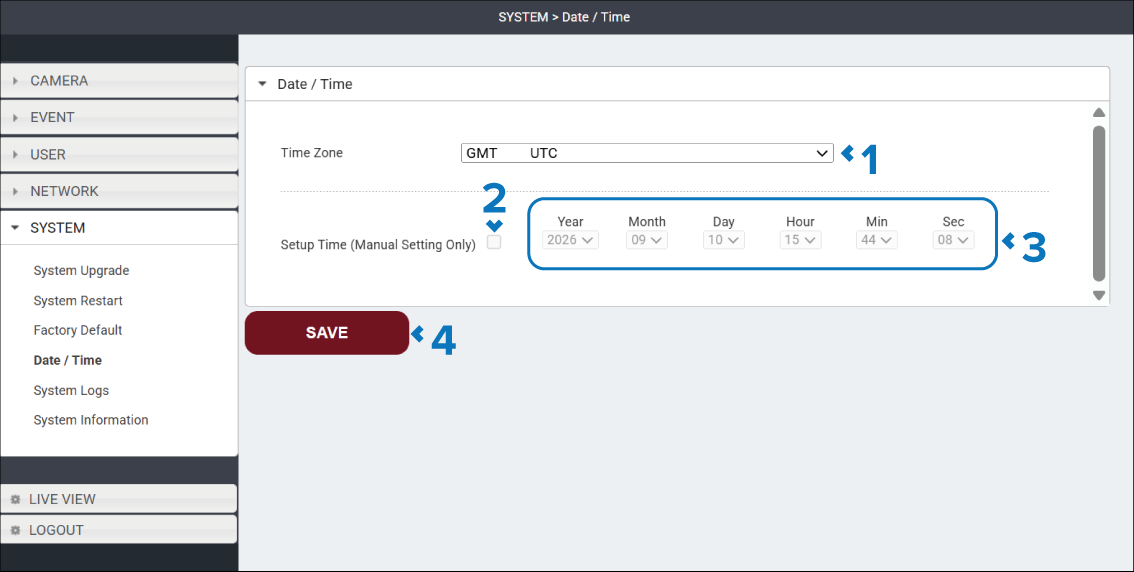
The Date / Time page is used to specify the camera’s Time Zone. If an NTP server has not been configured, this page can also be used to manually set the camera’s date and time.
The Date / Time page is accessed by selecting: in the Navigation pane.
Description |
|
|---|---|
1 |
Time Zone drop down Specifies the local time zone used by the camera. Select the time zone corresponding to the camera’s location to ensure event logs display the correct local date and time. |
2 |
Setup Time (Manual Setting Only) tick box When ticked the camera’s date and time can be configured manually using the date and time drop down boxes. |
3 |
Time and date drop downs Select the relevant values from the drop down boxes to configure the camera’s date and time. |
4 |
SAVE button Select the SAVE button to save any changes you have made before leaving the page. |