Override controls
While the Steer to Navigation mode is active, the Override option enables you to temporarily deviate from the current route line using the degree adjustment controls shown below to change your locked heading.
When the Override option is initially selected:
Your current locked heading will be maintained until changed.
All networked Alpha-Series performance displays with an Autopilot control preset page will display Override controls onscreen.
All compatible networked LightHouse multifunction display / chartplotters will enter Steer to Hdg.
Example: Steer to Navigation mode — Override:
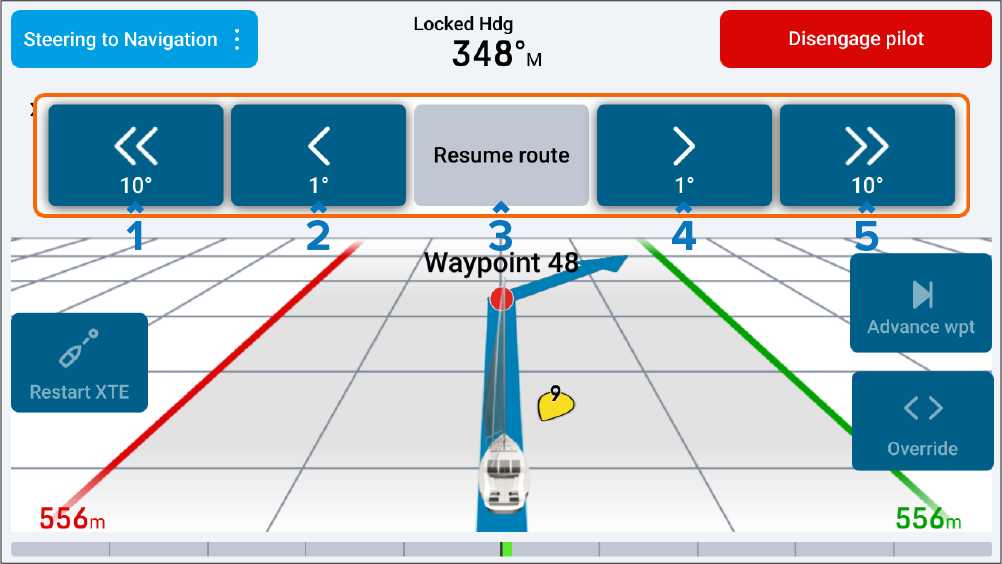
–10° — Selecting will adjust your locked heading by minus 10 degrees.
–1° — Selecting will adjust your locked heading by minus 1 degree.
Resume route — Selecting will either:
Display a Join route pop-up if your cross track error (XTE) exceeds 30 m (98.43 ft):
Choosing ALONG route leg will steer along the original track.
Choosing DIRECT from here will plot a new track from your current position to the first waypoint on your route.
Choosing Cancel will return to the Override mode.
Return to Steer to Navigation mode if you were previously navigating to a selected waypoint or cursor goto location.
+1° — Selecting will adjust your locked heading by plus 1 degree.
+10° — Selecting will adjust your locked heading by plus 10 degrees.
If you change the current ‘steer to’ mode or disengage the autopilot via your multifunction display / chartplotter while the Override option is active on your performance display, the Override option will be exited.