Automatic waypoint turning
If the Steer to Navigation mode is active and automatic turning has been enabled on your multifunction display / chartplotter, the following Turning to waypoint pop-up will appear upon reaching the waypoint arrival radius (pilot in track mode) configured on your multifunction display / chartplotter.
Waypoints must be farther apart than the Arrival radius (pilot in track mode) distance specified on your multifunction display / chartplotter.
The Arrival radius (pilot in track mode) can be set from the Alarms manager on your multifunction display / chartplotter, by navigating to: . The Arrival radius (pilot in track mode) overrides the standard Arrival radius notification.
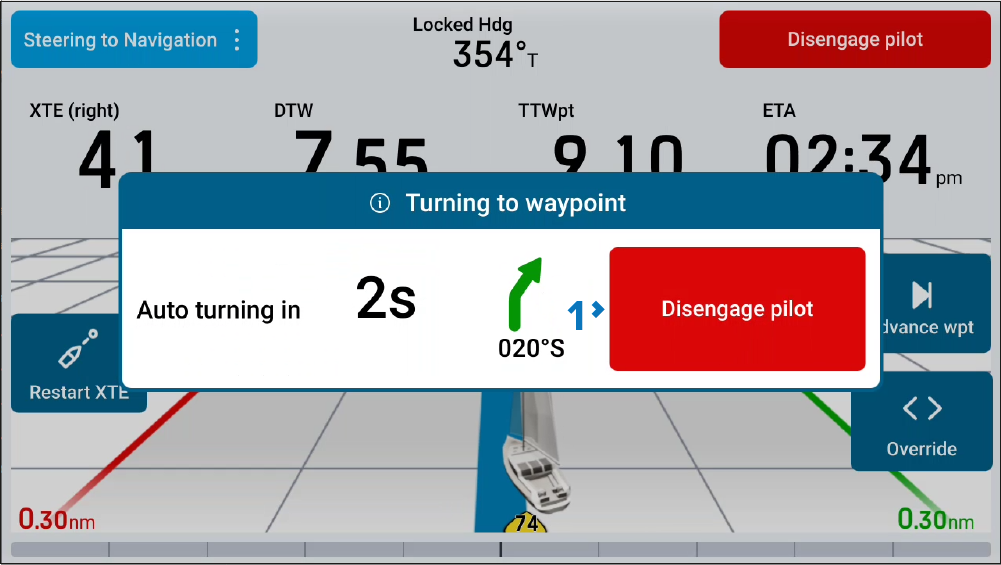
Disengage autopilot — Select to disengage the autopilot and prevent your vessel from automatically turning.
When the auto turn countdown reaches zero your vessel will automatically turn towards the next waypoint. NO user action or confirmation is required.