Setting up the camera via a Raymarine MFD
The CAM300 must be connected to the same network as your multifunction display in order for it to be detected.
SetupRaymarine MFD
Before attempting to establish a connection between your Raymarine® multifunction display and the camera, ensure that you have read and understood the relevant power connection safety information found within the following sections:
If you have previously changed the IP Type, Auto IP or Video Codec Web interface settings before attempting to connect the CAM300 to your multifunction display, you may experience Video app display issues or camera detection difficulties. Ensure that these settings have been reverted to default before attempting to use the CAM300 with your multifunction display.
In order to setup the camera for use with your Raymarine® multifunction display, follow the steps listed below.
- From the Diagnostics menu: .
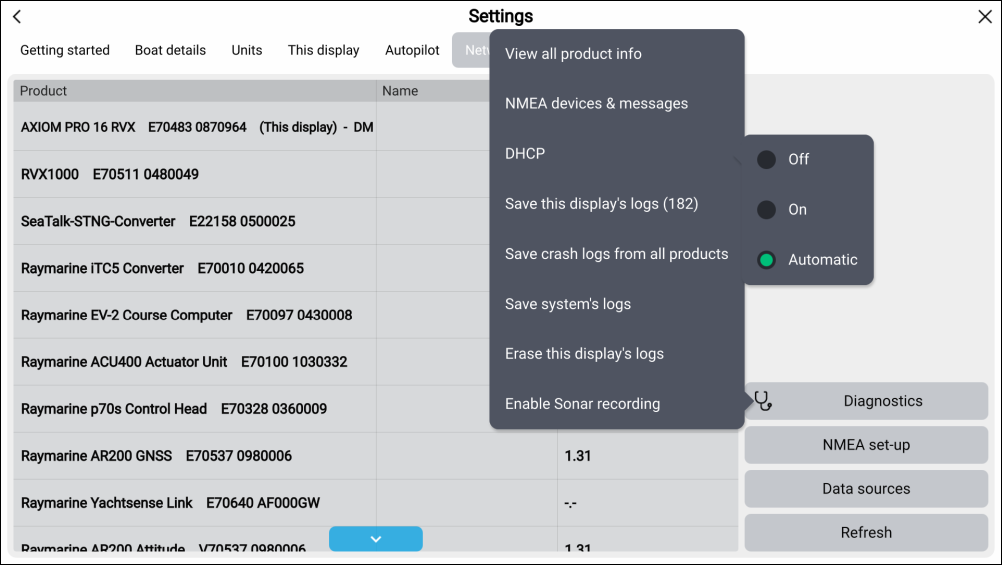
An IP camera can take up to 60 seconds to appear on a network. If the CAM300 does not appear under your multifunction display Product information or Network device list, ensure that you have waited a sufficient amount of time before attempting to Refresh via the Network menu.
If correctly configured, the CAM300 will appear on the Raymarine® multifunction display tab and the Video app live camera feed.
If you are experiencing issues, ensure that you have read and followed the information listed above before referring to the troubleshooting advice found within the following section: Troubleshooting