Waypoint list
Waypoints are managed using the Waypoint list.
Waypoint managementWaypointsListWaypointsGroupThe Waypoint list can be accessed from the Homescreen and from the Chart app:
Waypoints are sorted into groups. A list of groups and other available options are provided in the Waypoint list menu. The Waypoints list also identifies the number of waypoint in each group and whether the group is currently shown or hidden.
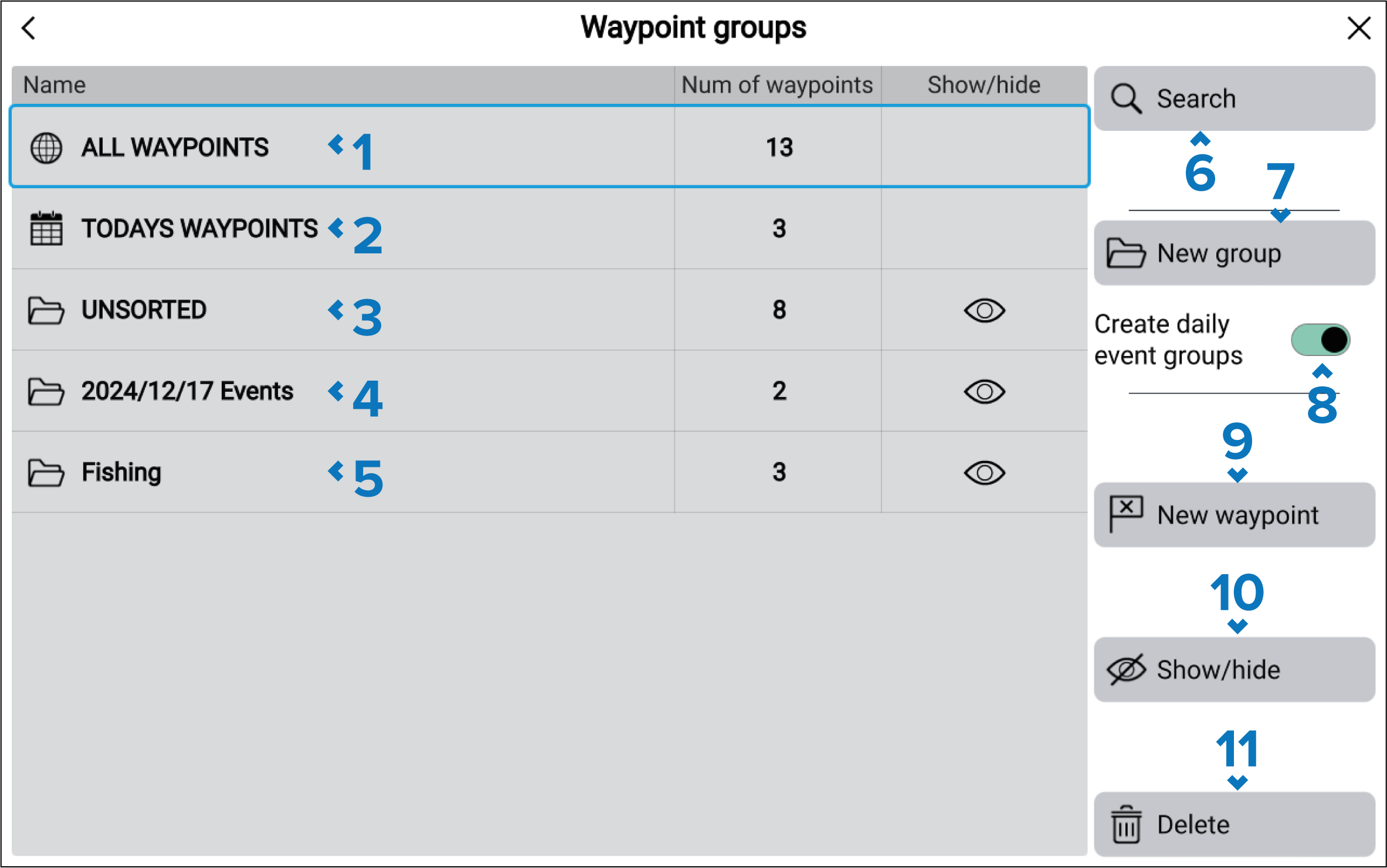
ALL WAYPOINTS — view a list of all waypoints.
TODAYS WAYPOINTS — view all waypoints created today.
UNSORTED — view all waypoints not assigned to a waypoint group.
Waypoints Event groupsEvent groupsEvent groups — event groups are created automatically each day when Create daily event groups is enabled.
Waypoint group — select to view a list of all waypoints in the group.
Search — search for waypoints by text or by symbol.
Waypoints New groupNew group — create a new waypoint group.
Create daily event groups — when enabled, waypoints are automatically saved by day into event groups.
The event group folders are named using the following date formatting (YYYY/MM/DD) so that they are ordered sequentially in the list. The naming format does not change with the Date format setting of the display.
New waypoint — create a new waypoint at your vessel’s current location.
Show/hide — show or hide waypoint groups.
Waypoints DeleteDelete — select waypoints to be deleted from the system.