Waypoint groups
Selecting a waypoint group from the waypoint list will display a list of the waypoints that are in that group and provide further options.
Waypoints Group listFor each waypoint the group list identifies the bearing and range from your vessel, the latitude and longitude of the waypoint and the date and time the waypoint was created.
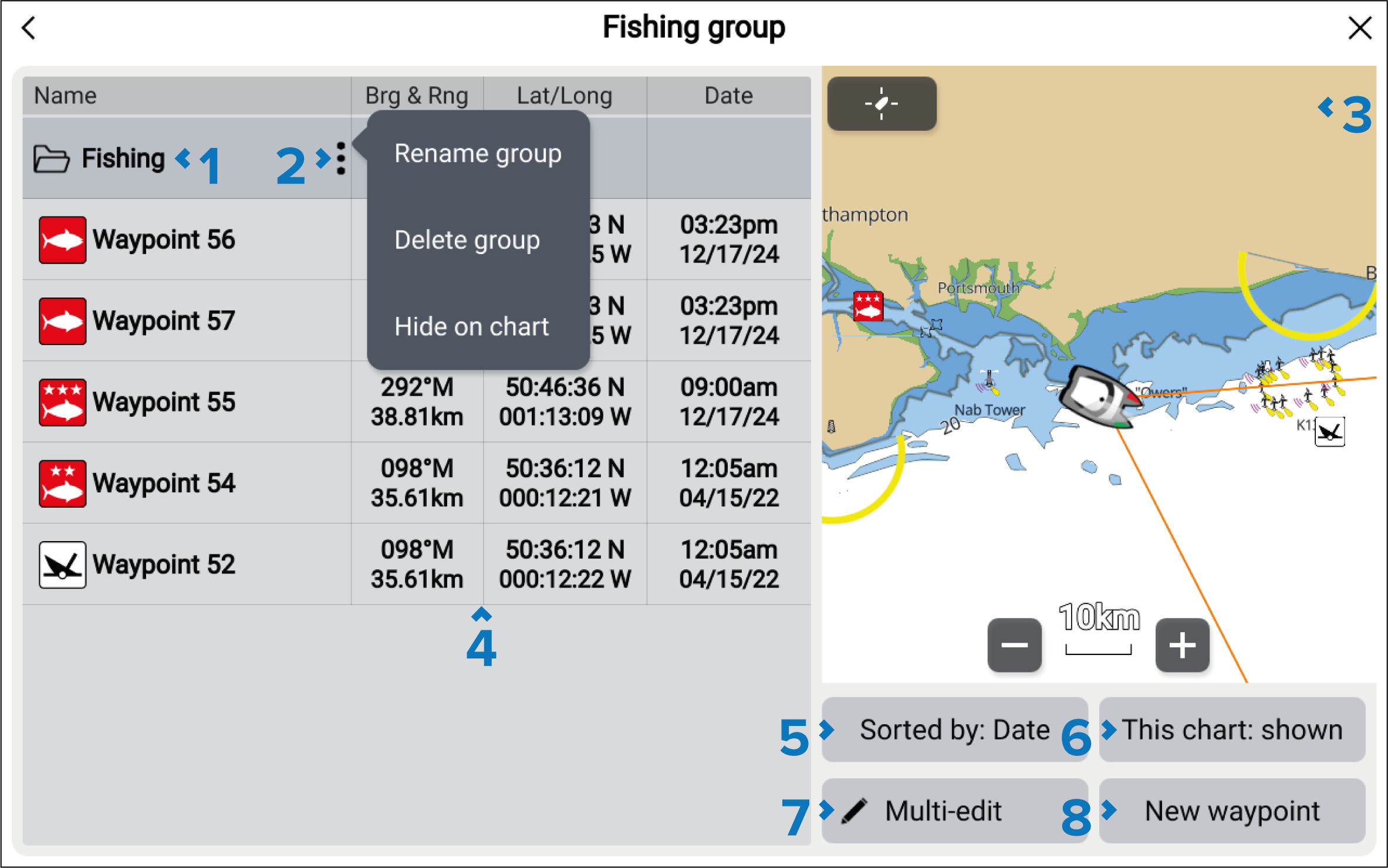
Groups — name of the waypoint or event group.
Menu — select to open the group pop-over menu. The following options are available:
Rename group — rename the group
Delete group — delete the group and all of its waypoints.
Hide on chart / Show on chart — when the waypoint list is accessed via the Chart app, this option allows you to show or hide the waypoints in the group. Hidden groups will not be displayed in the Chart app.
LiveViewLiveViewWaypointsLiveView — when accessed via the Chart app, the LiveView pane is displayed. When a waypoint is selected the LiveView will center the waypoint in the LiveView pane.
Waypoints — list of waypoints in the group.
Sort by — sort the waypoints in the group by either: Name, Date, Range, Symbol or Comment.
This chart: shown/This chart: hidden — identifies whether the current group is shown or hidden in the Chart app. Selecting this option will switch between hidden and shown. The This chart: shown/This chart: hidden button is only available when the waypoint details are accessed from the chart app.
Multi-edit — change details of more than one waypoint in the group. When selected, the options under the LiveView pane change and you can select the waypoints from the list that you want to edit. The following options are available:
Select all — selects all waypoints in the group.
Delete selected — deletes the selected waypoints.
Change symbol — changes the symbol used for the selected waypoints.
Move to another group — moves the selected waypoints to a different group.
New waypoint — creates a new waypoint at your vessel’s current location.