Mercury app overview
The Mercury app includes an Engine page and an Engine data page.
It is recommended that your Mercury® SmartCraft connect gateway is upgraded to the latest version of software by a Mercury® dealer.
Engine data for up to 4 engines can be displayed. The number of engines that data is displayed for is determined by the number of engines specified in the display’s boat details settings menu: .
Data for port engine(s) is displayed on the left dial, and data for starboard engine(s) is displayed on the right dial. In 3 engine systems, the right dial is also used to display data for the Center engine.
In 3 and 4 engine configurations, the RPM dial and transmission graphics are dynamic and will switch between engines under different conditions.
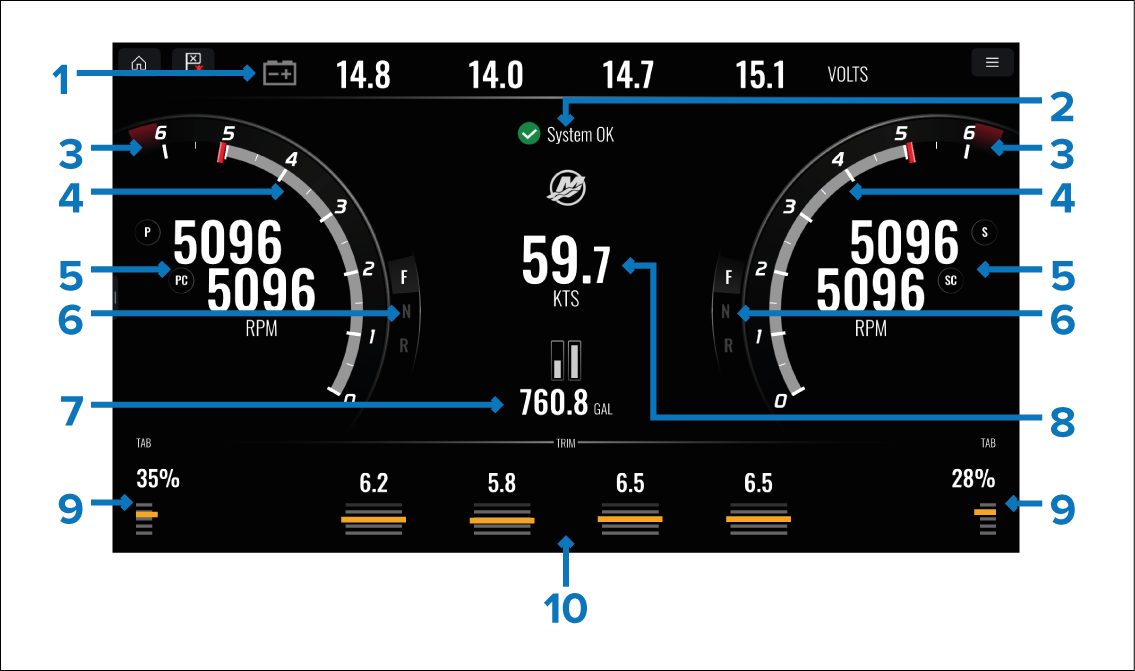
Figure 1. Fullscreen app page
Engine alternator voltage — In the fullscreen app the engine alternator voltage data items can be changed to show steering angle indicator instead.
System status — Engine status and start up sequence is displayed.
Dynamic engine RPM red zone — The RPM red zone is determined automatically based on engine type. When an engine reaches the RPM red zone, the red zone color will change from dark red to bright red.
Dynamic engine RPM indicator— Indicates the engine’s current RPM.
Engine RPM value — Displays current RPM values.
Dynamic transmission status — Indicates the current transmission gear.
Fuel tanks levels and total fuel — When a tank reaches 20% of its capacity, the level indicator will turn red. Up to 5 fuel tanks are supported.
Current vessel speed (Speed Through Water).
Tab position — Indicates vessel tab position as a percentage, with 0% being fully trimmed up (stored), and 100% fully trimmed down.
Engine trim — Indicates the engine trim position. Numeric values will be displayed between 1 and 10. Although the highest numeric value is 25, values above 10 are not displayed and are instead replaced by an icon, to indicate that the boat is being trailered.
The Mercury app can also be displayed in a splitscreen app page using either half screen portrait or landscape panes. When viewed in splitscreen app pages the page layout will be different.