Units settings menu
The Units settings menu is used to specify your preferred units of measure for data readings. The Units menu can be accessed from the Homescreen: , or from the Dashboard app: .
Measurement units
UnitsThe following units can be configured:
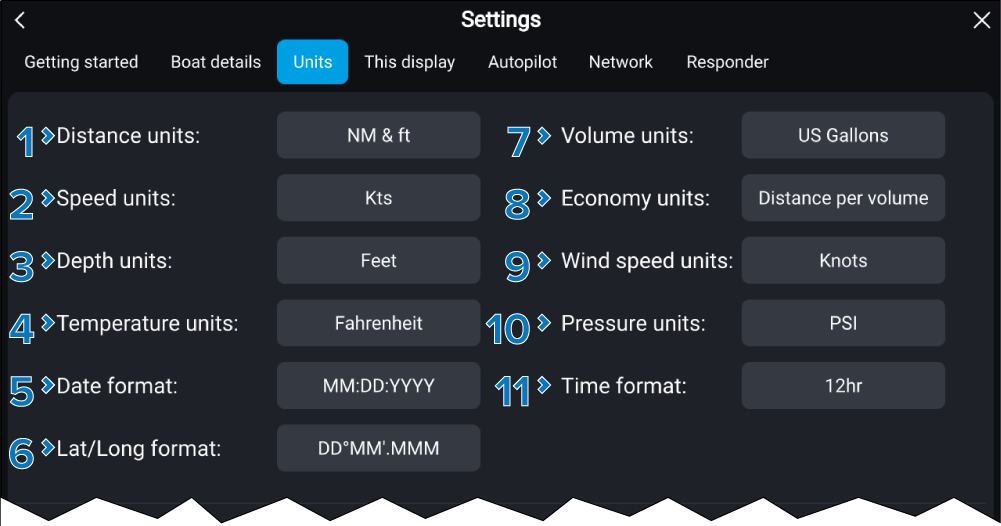
Measurement unit |
|
|---|---|
1 |
Distance unitsDistance units
|
2 |
Speed unitsSpeed units
|
3 |
Depth unitsDepth units
|
4 |
Temperature unitsTemperature units
|
5 |
Date formatDate format
|
6 |
Lat/Long formatLat/Long format
|
7 |
Volume unitsVolume units
|
8 |
Economy unitsEconomy units
|
9 |
Wind speed unitsWind speed units
|
10 |
Pressure unitsPressure units
|
11 |
Time formatTime format
|
Bearing, variation and time differentials
BearingVariationTime differentialsLoranBearing, variation and Loran time differential settings can also be configured from the Units settings menu.
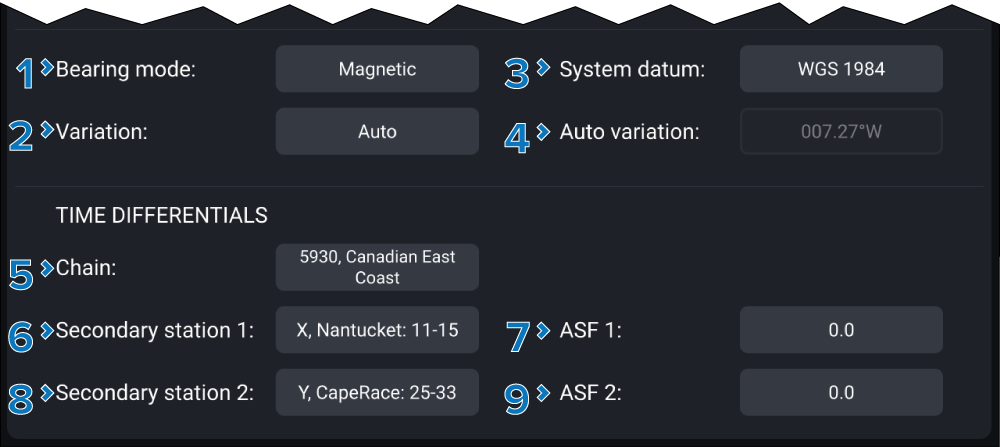
Time differentials are used for Loran positioning.
Setting |
|
|---|---|
1 |
Bearing modeBearing mode Determines if bearing and heading data is based on True, or Magnetic north. |
2 |
VariationVariation When set to Auto the display will automatically compensate for the naturally-occurring offset of the Earth’s magnetic field. |
3 |
System DatumSystem Datum Determines the datum used by your display. This should be set to the same datum used by your paper charts. |
4 |
Manual variationManual variation When Variation is set to Manual, you can specify an offset from 30° W to 30° E. |
5 |
ChainLoran Chain Select from the list of available Loran ‘primary’ chains. |
6 |
Secondary station 1Loran Secondary station 1 Select from a filtered list of secondary stations based on the selected chain. The Secondary station 1 cannot be set to the same as Secondary station 2. |
7 |
ASF 1Loran ASF 1 Additional Secondary Factors can be adjusted from -9.9 to +9.9. |
8 |
Secondary station 2Loran Secondary station 2 Select from a filtered list of secondary stations based on the selected chain. The Secondary station 2 cannot be set to the same as Secondary station 1. |
9 |
ASF 2Loran ASF 2 Additional Secondary Factors can be adjusted from -9.9 to +9.9. |